Synthesizer V Studio 2 Pro 2.3.0 Beta 1
Dear Users,
We are excited to share the much-awaited beta for the upcoming free update to Synthesizer V Studio 2 Pro.
Since the announcement of the Synthesizer V Studio 2 Pro 2.3.0 Technical Preview, the Dreamtonics team has completely overhauled the phoneme inventory and its underlying system. This new beta presents a near-final version of the system, resolving several longstanding phonetic inconsistencies and simplifying spelling conventions so it is overall easier to learn and memorize.
Importantly, the updated system provides access to a unified set of 150 standard phonetic symbols (X-SAMPA) shared across all languages. This offers a much more precise way to fine-tune a note’s pronunciation without relying on a large number of AI retakes.
Version 2.3.0 Beta 1 also brings to Synthesizer V several new features first introduced to Instrument X, for example, the option to synchronize parameters with note movement, and the capability to delete/duplicate multiple tracks at once.
Download Links
Windows: https://drive.google.com/file/d/1Oksyhqyc9b5nZ-VJ7n6bEo_-G0OLW6jF/view?usp=sharing
macOS: https://drive.google.com/file/d/1UlnBr_lYp-9A4mM7a4HLG17wJc-otB_c/view?usp=sharing
Audio Quality Feedback
Following reports of potential audio quality issues in the 205b1 voice update, we are conducting a blind listening test comparing voice versions 201 and 205b1.
The test consists of a brief calibration followed by 15 paired comparisons. We recommend using headphones or monitor speakers in a quiet room. You may leave optional comments on specific words or overall differences, and you may stop at any time.
The test will remain open until October 14. The test has closed and we are now analyzing the results. Thank you for your participation.
Phoneme System Update
Prior to version 2.3.0b1, Synthesizer V used a mixture of language-specific phonetic alphabets (such as Arpabet for English) and standard phonetic symbols (X-SAMPA) modified with custom additions. Based on feedback from user surveys over the past few months, we have introduced simplified, intuitive phonemes for everyday use in each language alongside X-SAMPA symbols for advanced fine-tuning.
To summarize the changes, English largely retains the Arpabet symbols with an additional ll to distinguish syllable-ending “l” from onset “l” and four experimental phonemes for a British accent. Mandarin, Cantonese, Korean and other languages previously based on X-SAMPA now default to symbols that mimic the spelling/standard romanization. For example,
| Format | Example |
|---|---|
| Mandarin | |
| Orthography (Hanzi) | 芳草碧连天 |
| Romanization | fang cao bi lian tian |
| Pre-2.3.0b1 phonemes | f A N tsh AU p i l iE :n th iE :n |
| 2.3.0b1 simplified phonemes | f aa ng c ao b i l iae -n t iae -n |
| 2.3.0b1 X-SAMPA | f A N tsh au p i l iE :n th iE :n |
| French | |
| Orthography | L’herbe tendre |
| 2.3.0tp1 phonemes | l E R b t A_~ d R |
| 2.3.0b1 simplified phonemes | l e- R b t an d R |
| 2.3.0b1 X-SAMPA | l E R b t A~ d R |
Japanese also retains most of the romaji symbols, with the addition of -i, -u, -N for non-syllabic vowels:
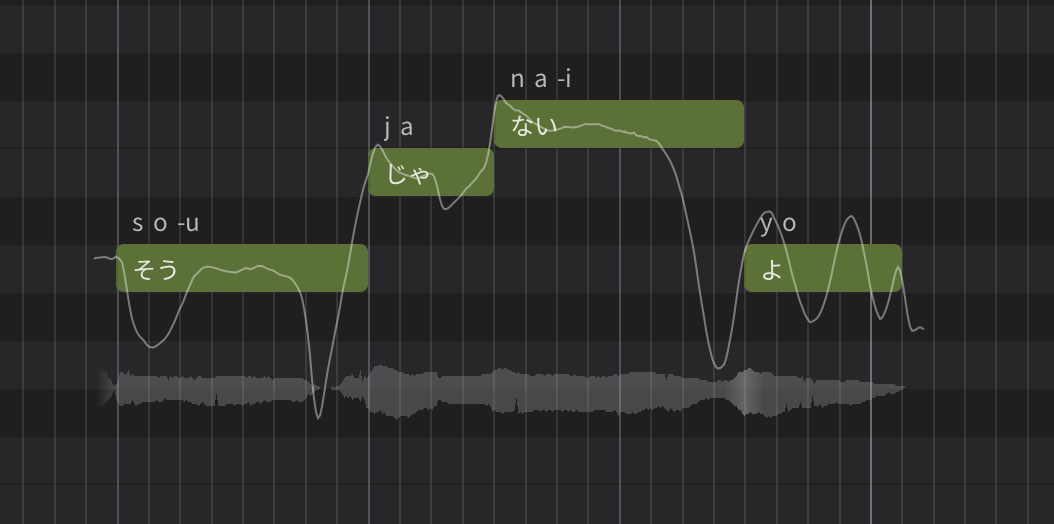
For detailed changes per language, please visit this page that lists reference tables mapping old symbols to new symbols.
Language-independent X-SAMPA Support
Version 2.3.0b1 introduces the ability to use a unified set of 150 standard phonetic symbols (X-SAMPA) across all languages. To enable this, turn on “Use X-SAMPA symbols” under the Language section in the Notes panel. This automatically converts existing phonemes into their X-SAMPA equivalents while maintaining the original pronunciation. From there, you can override phonemes using a much broader selection of international phonetic symbols.
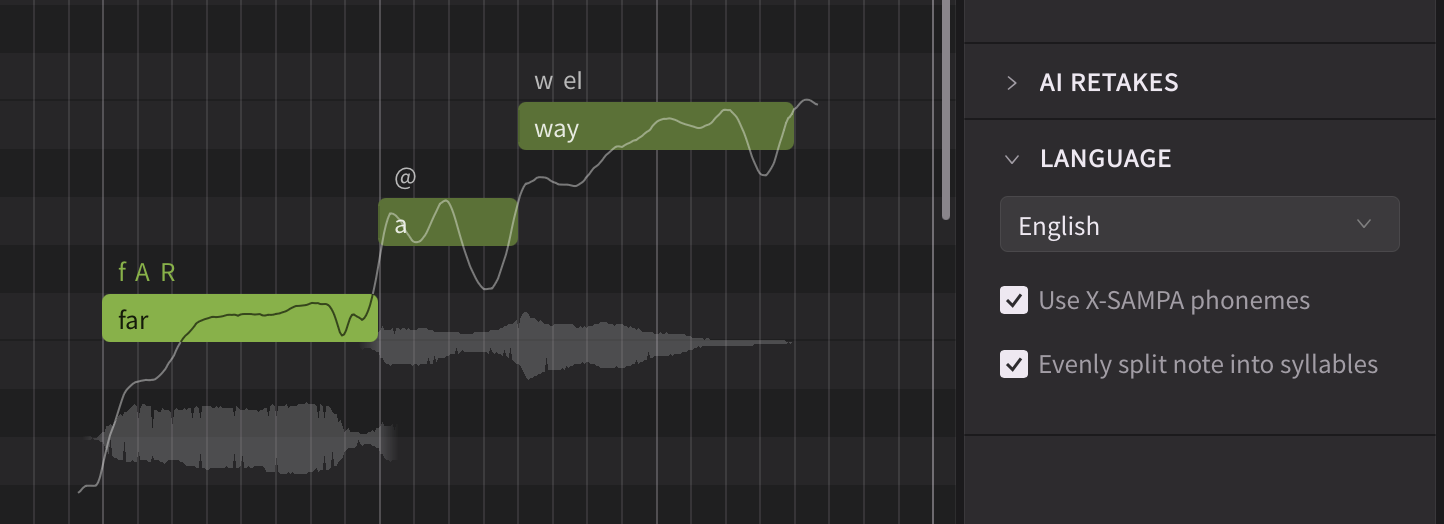
A similar option is available in the Dictionary panel. You can now define custom dictionary entries using either the simplified language-specific format or the standard X-SAMPA format. Using X-SAMPA allows access to the full inventory of phonetic symbols, which is especially useful for simulating languages not natively supported by Synthesizer V.
This page lists all X-SAMPA symbols currently supported by the system.
New Vocal Fry Phoneme
The new phoneme system also disentangles vocal fry from the existing cl phoneme for glottal closure. It introduces a new vf phoneme to all languages.
vf can be inserted before or after a note, or between a vowel and a consonant, enabling different singing expressions.
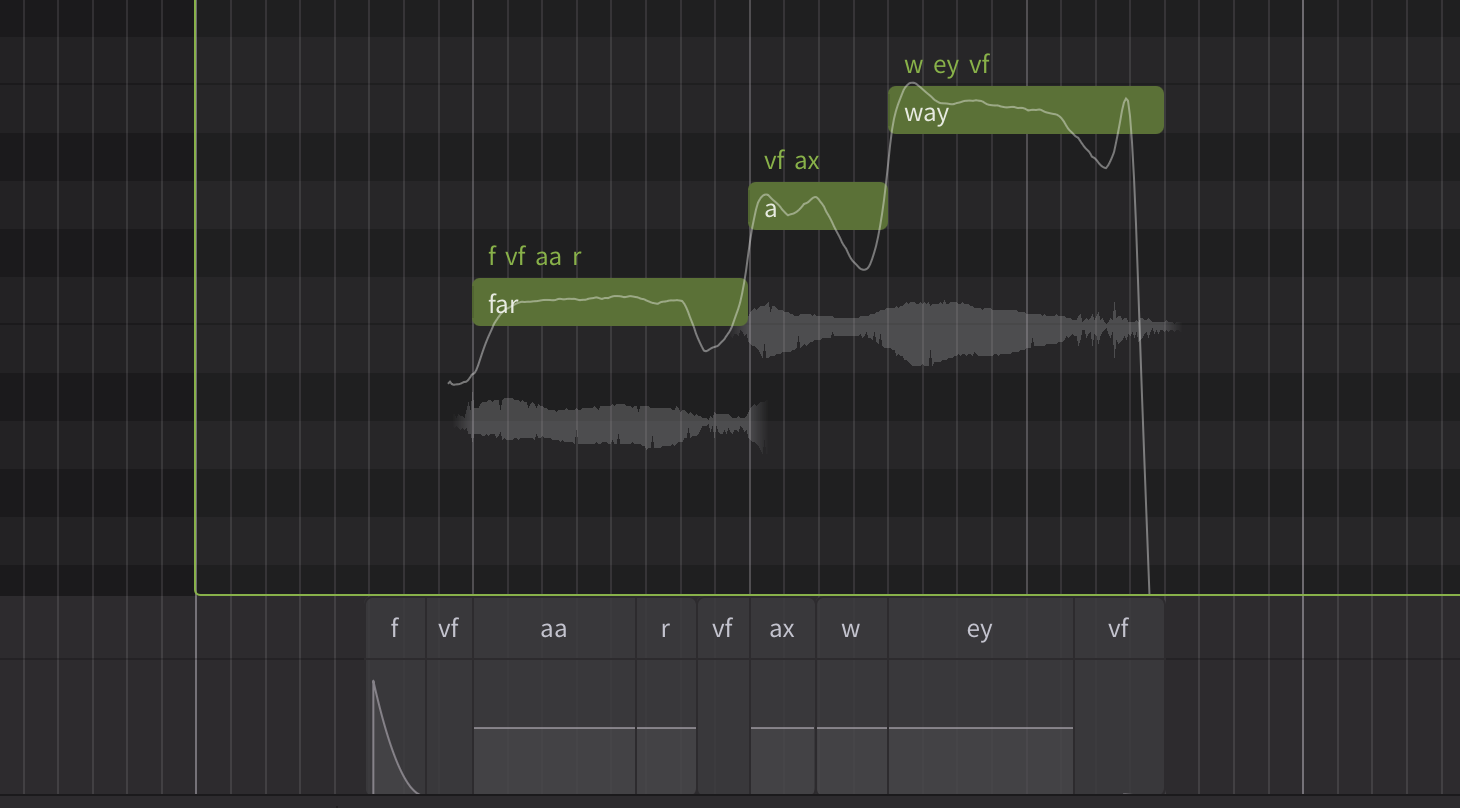
(Inserting
vf at the end of a note, like in this example, often leads to a pitch drop effect.)
Italian Cross-lingual Synthesis
Italian is now available as a cross-lingual synthesis language in the 205b1 voice update.
Because Italian spelling aligns closely with X-SAMPA, Italian phonemes default to standard phonetic symbols (X-SAMPA). Enabling “Use X-SAMPA phonemes” in the Notes panel grants access to an even broader set of phonetic variations.
Syllable Breaking Styles
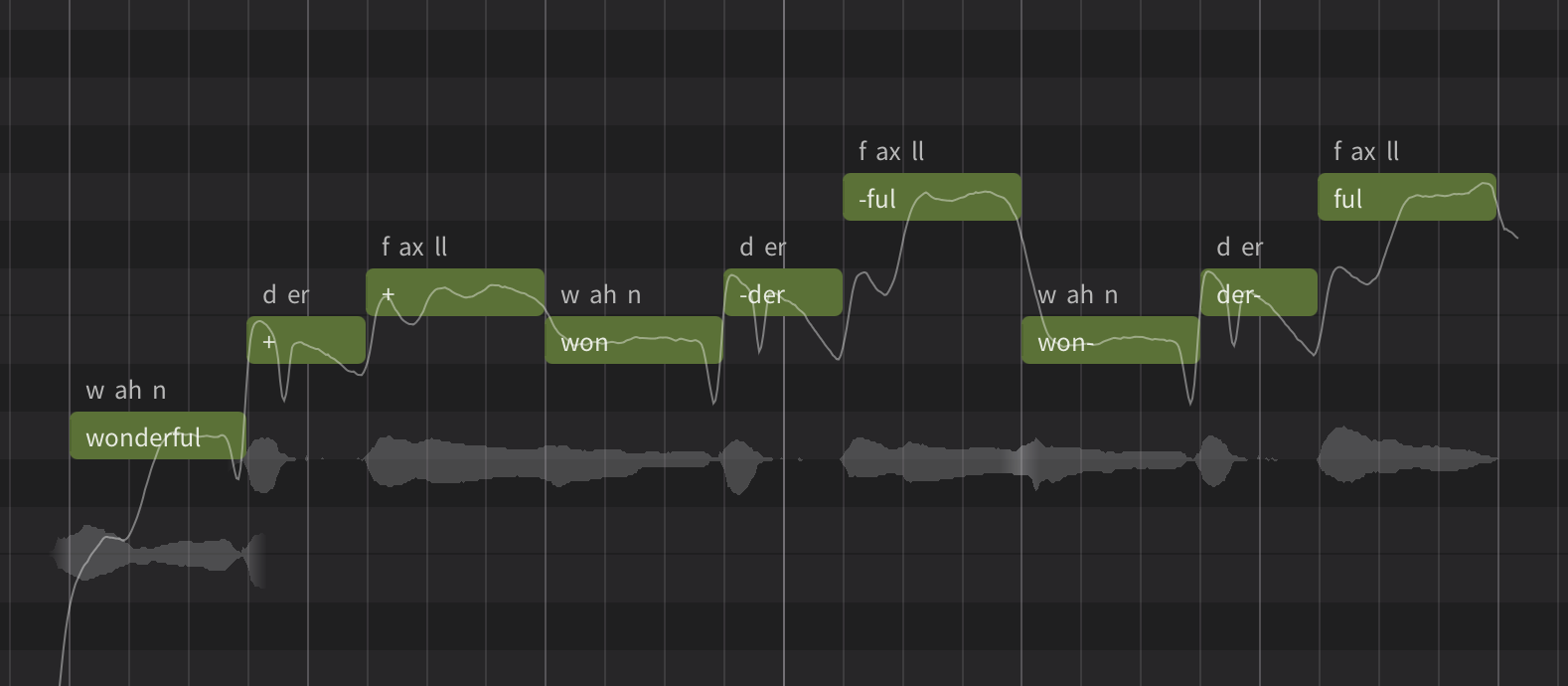
Aside from phoneme-related changes, version 2.3.0b1 also enhances lyrics-to-phonemes conversion. For non-CJK languages (e.g., English, Spanish, …), a hyphen at the beginning or end of a note is accepted as a syllable breaking indicator, in addition to the existing “+” mark supported since the beginning of Synthesizer V.
Reporting Issues
Please submit bug reports through our support form. Please specify version “2.3.0b1” in your ticket:
https://dreamtonics.zendesk.com/hc/en-us/requests/new?ticket_form_id=44558189476505
While we welcome feedback on the forum, we may not be able to address the replies promptly. It’s also difficult to request necessary details (e.g. project files) for bug reproduction in a public forum. Therefore, we kindly request that you report issues via the support ticket system.
Synthesizer V Studio 2 Pro 2.3.0b1 (Oct 8th, 2026)
The following are changes since 2.3.0tp1.
New Features
- Overhauled the phoneme system: simplified/X-SAMPA switch, new vocal fry phoneme, and language-specific phoneme additions.
- Added cross-lingual synthesis support for Italian.
- Added a new settings option to synchronize parameters with note movement.
- Added key shortcuts (default: up/down arrow keys) to move selected notes up/down by 1 semitone.
- Added real-time phoneme spell checking to the phoneme input box above notes.
- Added ARA support for LUNA.
- Added to plugins a “Reset Window Size” command under View menu.
- Implemented a render cache rotation strategy and settings option to limit the disk usage.
Feature Enhancement
- Made the settings option to disable MIDI Input Device also available in the standalone.
- Allow multiple selection of tracks and editing track-level properties together.
- Optimized render cache to reduce the space consumption.
- Improved MusicXML support.
- Updated macOS app icon.
Behavior Changes
- Changed the key shortcut for navigating to the previous note to Shift + Tab on macOS.
- Added “*” as the default shortcut for starting a recording.
Bug Fixes
- Fixed a display-only issue showing interrupted pitch curves.
- Fixed audio not rendering when reopening an ARA project on some DAWs.
- Fixed a memory leak in ARA plugins on certain DAWs on macOS.
- Fixed data loss in macOS REAPER after setting up ARA and saving & reopening a project for the first time.
- Fixed Ctrl key unexpectedly triggering playback when using the ARA plugin on Windows.
- Fixed audio stutters when using the instrument plugin with a large buffer size.
- Fixed pitch control points/curves going beyond the piano roll’s vertical limits after note transposition.
- Fixed displaced notes after finishing MIDI recording inside some note groups.
- Fixed cropped Settings and Product Manager windows when running inside ProTools with high DPI settings enabled on Windows.
- Fixed the bottom part of the piano roll getting blocked by automation/phoneme panels.
- Fixed several UX issues with the preset selector.