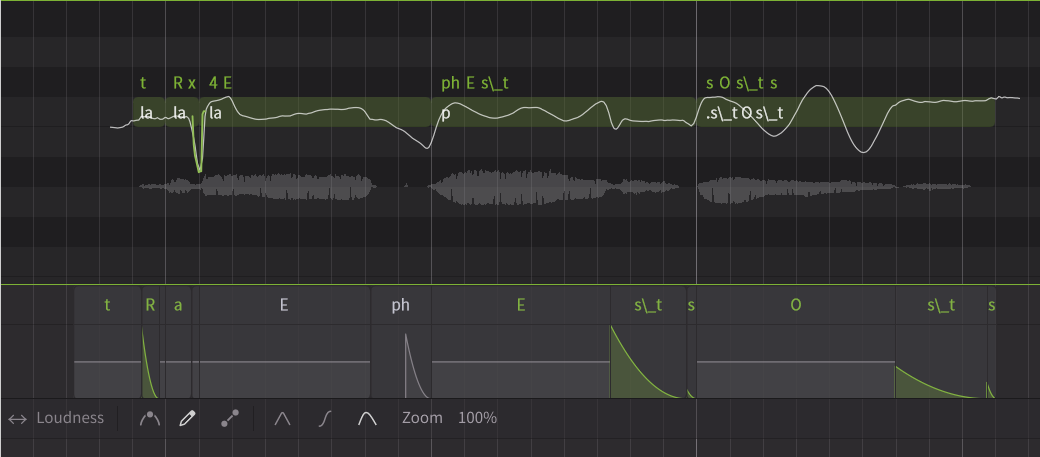
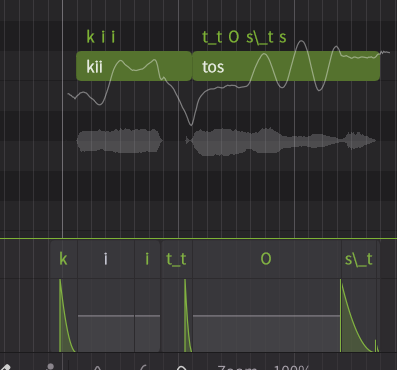
sometimes it doesn’t approximate well, especially when adjacent to O, so i have to mix it with s and mess with timing
1 Like
ARPABET unfortunately doesn’t distinguish between the aspirated and unaspirated allophones of the unvoiced plosives in English, the unaspirated forms happen mostly in syllable coda position. German is also lacking this same distinction.
I have noticed that the voices are unstable, as if they have not been trained enough. It’s not difficult for me to stumble upon situations where the voices completely break down into noise.
See, I’m not having this problem. If anything, the voices sound better to me. What OS are you using?
The problem of the voices not sounding like themselves since v201b2 is still present. Every single voice randomly morphs in and out of what i can only describe as a raspy child. This was not a problem in v200 and v201b1 but has been in every version onwards.
I’m going to start this off by saying I’m very much impressed with the newest beta in terms of new content. Especially the X-SAMPA phonemes, and the other new ones that have been added. For instance, I really like how I can keep Mai in Japanese and use English X-SAMPA phonemes to retain a bit of her original accent. I’m loving the ability to mess around with pronunciation, and the potential to indirectly support other languages by using a lot of different phonemes. I would say that’s my favorite addition in the update, and I’m glad Dreamtonics is putting work into their software to try and make it better.
However, there’s one huge elephant in the room that really, really needs addressed. A lot of voices just don’t sound good right now. I myself only have Mai and Liam, but I have noticed that their voices just sound different, and not in a good way. I have noticed the autopitch isn’t all that good. I don’t have any screenshots or anything right now, but sometimes it doesn’t really feel as expressive as it used to be, or it has these little hiccups that I think make it noticeably worse.
The voices sound worse in some ways as well. I don’t really know how to describe it because I’m still getting used to all the different terms and stuff, but the quality degradation from 201 to the 205 beta is noticeable to me. The timbre of the voices just feel off. Messing with the vocal modes sometimes makes the voice feel off even more. It could be that I’m just used to their 201, but I can’t shake just how Liam and Mai sound worse.
Again, I’m no seasoned vocalist, nor someone with an extensive knowledge of singing. I’m very much learning as I go, but even I can tell that voices right now just don’t sound or hit the same. I’ve seen other people showcase differences of their voicebanks and have similar complaints to mine, so it’s not just me.
I really want to like this beta because I am extremely grateful for the new opportunities for language and phoneme stuff. Really loving how I can use X-SAMPA phonemes to really give more customization to the voices I own, really excited for the British English phonemes too, and vocal fry. I’m just really hoping that once it gets out of beta, a lot of the issues I, and other users have will be fixed because I really want this update to be of good quality and improve upon 201’s flaws. I’m just worried that once it gets out of beta, a lot of the above issues will still be present and eventually will be passed on to third-party voicebanks. I know it’s still beta, so there’s definitely room for improvement, but I have a little bit of worry in what the final product will be like at the current moment.
Apologies for the ramble. I just want to make it clear that I love your product, but there’s glaring issues that desperately need fixing.
Edit: Wrote this at 2 AM, sorry for any mistakes or errors lol. 
1 Like
In case someone from Dreamtonics reads this… (since their support still refuses to reply via email)
I’m still trying to make SynthV sound French, and I still can’t. I don’t know how it’s technically feasible, but vowel sounds still need to be greatly improved, as they currently still sound too English.
French people speaks/sings vowels in a more “square”, rigid way, as opposed to the more “relaxed” English vowel sounds. Phonemes like “è”, “an”, “on”, “in” seem to have been improved a bit since the previous version. But “é”, “i”, “ou” are still too weak. They should be kind of exaggerated to sound more like authentic French.
The “i”, in particular, is still an English short “i” as in “kick” (which roughly matches the French “è”). It should sound closer to a long “i” as in “feed”, but not as long, though.
I tried to set the lowest Mouth Opening parameter on “ou”, but it barely changes anything. The default Mouth Opening on those phonemes should be wider (è) or narrower (an, on, ou). “u” (French) sounds too English as well, like the English “u” as in “you”.
Regarding consonants, the “r” is still way too English. The French “r” is more “harsh”.
As I already wrote, the way it sounds now (“too much English”) can be interesting stylistically, if you want your singer to sound like an English singing French. Therefore I think they could/should add an Authenticity or Realism setting that would allow users to decide which style they want between relaxed and harsh vowels.
Dreamtonics, read the forums and consider our feedback.
1 Like
spin, sty, skill are unaspirated.
upon further testing, 205b1 Mo Chen 2 actually improved and no longer lisps the French “R” that much
Hi… Cubase 15 Windows 11 user here… Anyone else missing the horizontal scroll bar on the piano roll on this build? The previous build 2.3.0tp1 is OK.
When you say you hear Mai And Liam not sounding good, are you using the current versions or the sound banks or are you also trying out the older sound banks in the new Beta?
The listening test was a good start, but can we have one with much more voices with different native languages using cross-lingual synthesis, including v200 as well, preferably also displaying what voice the sample is from? XLS is where the current issue presents itself most, muddying vocal identity and flattening dynamics. When crossing into English, 201 through 205, foreign voices also tend to pick up distinctly southern US-American tendencies, which is quite distracting. In 200 native accents sometimes are strong to the detriment of the user, but the issue was often bugs in the actual model rather than the accents themselves. I still prefer v200 for most foreign voices when possible because of it.
3 Likes
It seems that older voices, such as those for SV1 and SV2 voices older than v205b1, can no longer use X-SAMPA (pre-2.3.0b1 phonemes) in languages such as Mandarin. Only simplified phonemes are available. And it is hard to distinguish phonemes between languages if more than two languages are used in a song.
Shall we merge phonemes that are not contrasted, like ai and aI (Unified X-SAMPA system, the same below)? But seperate those which are contrasted and listed, like English pin and spin, the former being ph, the latter being p.
1 Like
Do choir work on this?
Yes, missing here on Cubase 15, Windows 11. I’m not sure whether alternatives existed before (I always used the scroll bar), but certainly now you can use shift+ scroll wheel if you’re using a mouse or two finger swipe if using a trackpad to horizontally scroll. Not sure if the missing scroll bar is intentional or not.
1 Like
Just as mentioned, synth v following other developers in breaking software. I wasn’t going to update until it was safe however hearing pretty good feedback I decided to go head so I did today and regret is all over me. Drawing in pitch causes infinite up or down pitch that ai retake will Not correct. It can be undone (ctrl z) though but why should it have to be. The scroll bar is missing for lower half (notes edit) and I’m positive there are many other things broken but too frustrated now to even bother
Seems to be a trend with developers these days not just dreamtonics. The long wait to find out it got worse. Amazing!
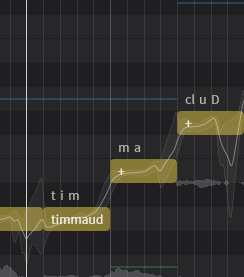
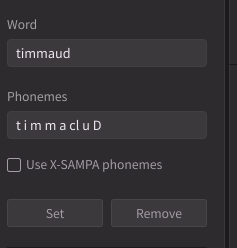
Just realized that I can now put cl in multi-syllabic words in the library.. so i dont have to go to each word and put ‘+ or cl in phoneme… This saves me a lot of time doing my choirs in my language which has a lot of glottal stops… Thanks a lot for this, ive been asking for this for months..
1 Like
I have noticed that, but it’s not exactly missing. It’s being rendered behind the parameter panels, which makes it inaccessible when they are open. For now, I’ve been using Shift + Mouse Wheel as a workaround.
1 Like
Thanks for confirming, greatly appreciated!