Dear Users,
We’re excited to share the third and final beta (2.1.0b3) for the upcoming free update to Synthesizer V Studio 2 Pro.
Download Links
Windows: https://drive.google.com/file/d/1pVYbp_CPpJBFetVsbvq_h6FgvaRYRTie/view?usp=sharing
macOS: https://drive.google.com/file/d/1EsMivrflGq0aNQ-7sE-UO3zWdibIMuGm/view?usp=sharing
About This Beta
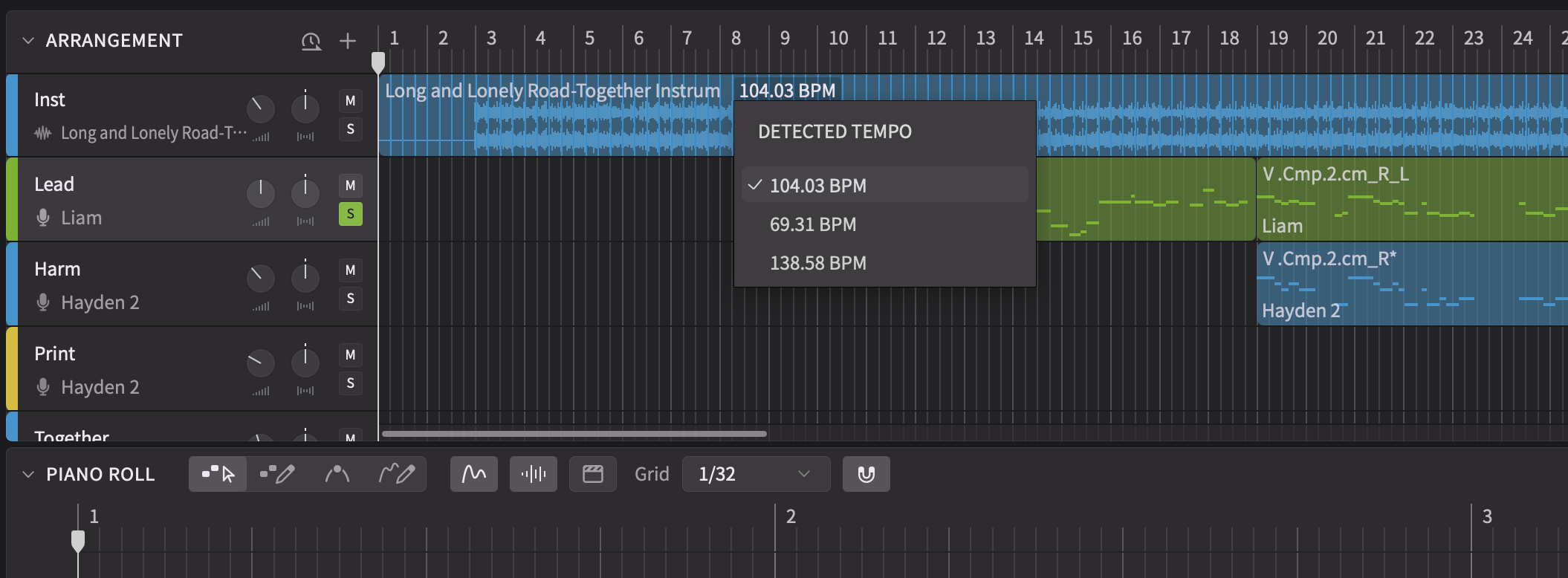
This third beta (2.1.0b3) introduces automatic tempo detection for imported audio. The feature analyzes audio files and presents tempo estimations with a corresponding beat grid to assist alignment.
This build also focuses on stability improvements, addressing reported crashes related to group operations, undo/redo operations, and plugin shutdown.
We believe this beta represents the final testing phase before the official 2.1.0 release and appreciate your continued feedback, particularly regarding any remaining critical issues.
See here for the release notes for 2.1.0b1 and 2.1.0b2, which added new pitch editing capabilities and Pro Tools ARA support.
Reporting Issues
Please submit bug reports through our support form. Please specify version “2.1.0b3” in your ticket:
https://dreamtonics.zendesk.com/hc/en-us/requests/new?ticket_form_id=44558189476505
While we welcome feedback on the forum, we may not be able to address the replies promptly. It’s also difficult to request necessary details (e.g. project files) for bug reproduction in a public forum. Therefore, we kindly request that you report issues via the support ticket system.
Synthesizer V Studio 2 Pro 2.1.0b3
New Features
- Added tempo detection and beat grid visualization for imported audio.
Behavior Changes
- Changed the color of overlapping notes.
- Open the lyrics editor on the next note when entering a space character into the note’s lyrics editor. This behavior can be turned off in the settings.
- Changed autosave strategy to keep a rotating backup of projects opened in the last 7 non-consecutive days.
Feature Improvements
- Redesigned the silence indicator that shows when two neighboring notes are separated by a small gap.
- Allowed automatic lyrics language detection to be turned off in the settings.
- Added a warning icon to the phoneme area above a note, to be shown when invalid phonemes are entered into the note.
Bug Fixes
- Fixed crashes when loading a new project without first clearing the selection.
- Fixed crashes when moving groups across tracks with “Show Melodies from Other Tracks” option turned off.
- Fixed crashes during program shutdown on Windows, causing the recovery dialog to appear despite no data having been lost.
- Fixed crashes after performing certain undo/redo operations related to the creation/removal of note groups.
- Fixed crashes after deleting a copy & pasted pitch control point that was created automatically during an area-selection (from 2.1.0b1).
- Fixed un-rendered notes when a note that begins with a manually inserted “cl” phoneme is followed by a legato.
- Fixed Vocal Mode options not being listed in the parameter panel immediately after opening a saved project by double-clicking, or after opening a saved DAW project.
- Fixed autosaved projects being accidentally deleted when quitting the plugin without saving in certain DAWs.
- Fixed undo/redo for group creation and audio import being performed together with the previous editing operation.
- Fixed the metronome’s on/off status not being reflected in real-time during playback.
- Fixed the cache for rendered audio not being reset after removing all notes in a group.
- Fixed the ARA plugin intercepting key shortcuts sent to Pro Tools (from 2.1.0b2).
- Removed the empty menu showing inside the ARA bridge when running in Logic Pro (from 2.1.0b2).
- Fixed Product Manager launching the system browser when opening it inside the program (from 2.1.0b1).
