I’d like to share a tool I’ve been working on: SynthV Translator — a command-line utility that lets you make Synthesizer V voices sing in languages they weren’t originally designed for.
It works by converting text from languages like German, French, Italian, Portuguese, and Russian into phoneme sequences that SynthV can render, using a combination of eSpeak NG for IPA conversion and custom mapping files that map IPA phonemes to SynthV’s existing phoneme sets (English, Spanish, Japanese, etc.). The tool automatically picks the best-matching voice language for each phoneme and handles syllable boundaries, so you get output you can use right away.
Key features:
Supports German, French, Italian, Portuguese, and Russian as input languages
Weighted alternative pronunciations so you can pick what sounds best
Language switching optimization to minimize unnatural voice switches within syllables
Includes a JS script for SynthV that lets you paste the translator output and apply phonemes and language overrides to selected notes directly in the piano roll — no manual copying per note
Quick example:
Input: python synthv_translator.py "Guten Morgen"
Output: <spanish> g u - t e n <spanish> m o r - g e n
The output tells you which voice language to use for each phoneme. The included inserter script handles all of that for you automatically.
The tool is open source and available on GitHub. It also contains extensive documentation to get you started right away.
Adding new languages is straightforward — you just need to create a JSON mapping file. Contributions are welcome!
Hi Martin, thank you so much for sharing your translator.
I installed the scripts according to your instructions, and everything worked perfectly right away (in German for me).
However, the initial results aren’t quite as impressive; it seems there aren’t many more possibilities with the existing phoneme vocabulary of the voices.
Just as an example:
the German word “Frühling” (spring) is translated as <spanish> f rr i u - <english> l ih ng
and that sounds very strange.
But I’ll continue testing, especially the variations.
In any case, your project is a huge help for anyone planning to use the currently available voices with their individual languages.
nice work. I have not yet tested the results of it, but already a very litttle PR for you so that one can easyly use this tool in UNIX like environemnts or WSL2. If you like I can also describe isntallation steps for those that uses WSL2. But I think most WSL2 users will not require additional explanations ;-).
Yes, the Mandarin phoneme “y” is the closest to the German “ü”; I’ve noticed that too.
However, I can’t find a consonant among the Mandarin phonemes that corresponds to the German “r”. The “x” doesn’t work at all; the Spanish “rr” is a better match.
For me, the best compromise at present is the Spanish phoneme sequence “f rr u i”
(and not f rr i u, as stored in the mapping file de.json).
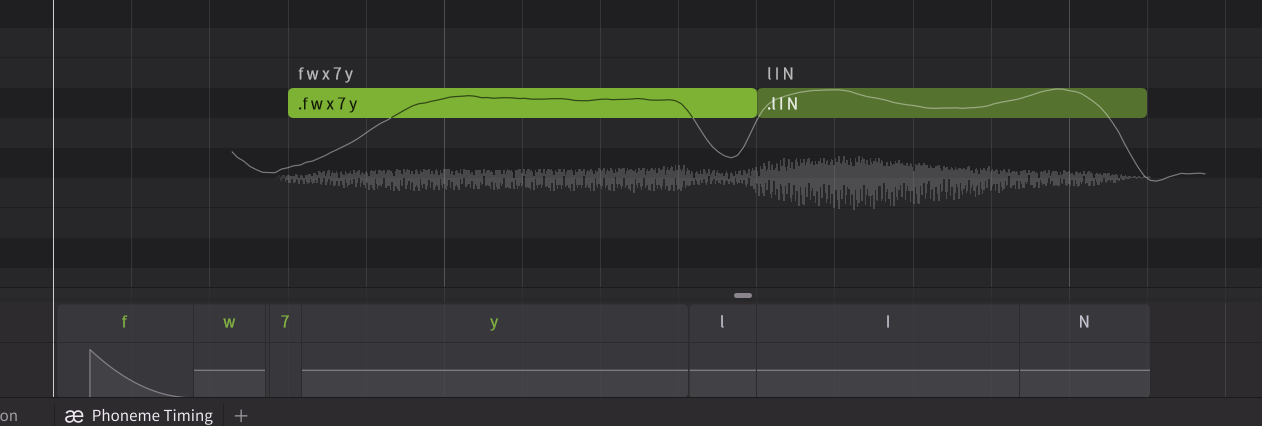
<cantonses> l I N for the German “ling” actually fits very well, thank you!
Since I want to perform “Frühling” in a choral arrangement, I’m currently focusing on Choir #2.
Following up on your suggestion, I think the phoneme sequence f 7 y works even better, and that’s without changing the default Phoneme Timing settings.
It might be different with other voices. Which voice(s) did you try it with?
@honki-bobo
A question for the developer of the translate tool:
Would it be conceivable that phoneme sequences found by the user for certain syllables or words (as in my example case <mandarin> f 7 y - <cantonese> l I N for “Früh-ling”) could be listed as preferred alternatives in the future?
Since we opened pre-orders for the professional notation versions of Cantai, our development sprint has been focused on one goal: making Cantai a truly universal tool for the global composer community.
Today, we are thrilled to announce that the upcoming Dorico and Sibelius releases will launch with a massive expansion of our linguistic engine. We are moving beyond our initial testing phase to support the “Big Seven” languages of the classical, liturgical, and contemporary vocal repertoire.
The “Big Seven” Languages: Included at Launch
We have rebuilt our phonemization engine to ensure native diction and precision for:
• English & Latin
• Japanese
• Spanish
• Italian & French
• German (Finalizing our core library now!)
From the foundational Latin of the choral tradition to modern art songs in Japanese or German, Cantai now provides the linguistic accuracy required for professional playback directly within your score.
thanks for all the feedback so far, very much appreciated.
@l0b1 Thanks for contributing to the project. I’ve merged your changes. I definitely need to install and configure black formatter
@odod For now I will focus on improvements and new features. For new languages I rely on the community, especially for the ones I don’t speak myself, which is basically every language except German and English (and maybe a bit Latin).
@Pat That sounds like a very useful feature. I think I can add sections “word_prefs” and “syl_prefs” in the mapping file so users can define preferred phoneme sequences for certain words and syllables respectively. Then I can check the word_prefs before the syllabification, and the syl_prefs before the IPA transcription. It will take some time, but definitely doable.
well, it went faster than I anticipated, and now here’s the update: Custom phoneme preferences are now supported!
Thanks to the great feedback from @Pat and @ZLY_CZLOWIEK — you can now store your own preferred phoneme sequences directly in the mapping file. If you’ve found a combination that sounds better than the automatic translation for a specific word or syllable, you can save it so it’s used automatically every time.
Two new options in the mapping JSON:
word_prefs — override the entire phoneme output for a specific word (e.g. “Frühling” → <mandarin> f 7 y - <cantonese> l I N)
syl_prefs — override individual syllables globally, so they sound right wherever they appear
Both are case-insensitive and completely optional — existing setups continue to work without any changes. See the MAPPING_GUIDE for details.
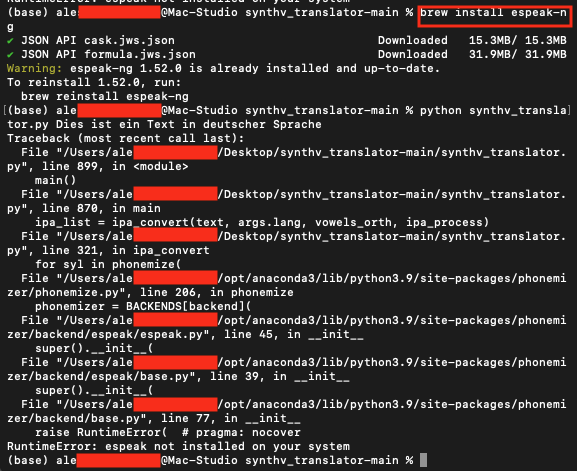
Hy mate, I’m pretty sure that I’ve done all what is described in your README but it gives me everytime this output (as in the screenshot) that is saying “espeak-ng” is not installed on my system. Sure it has been tested on Mac systems?