Version 2.2.1b1 focuses on post-release bug fixes for the recent 2.2.0 release, addressing issues not previously detected during beta testing.
Addressing Performance Degradations
We have received feedback from a limited number of users concerning a degradation in rendering speed between versions 2.1.2 and 2.2.0. Our investigation has identified optimization bottlenecks on CPUs featuring distinct performance and efficiency cores. This issue primarily impacts high-end Intel processors and, to a lesser extent, Apple Silicon.
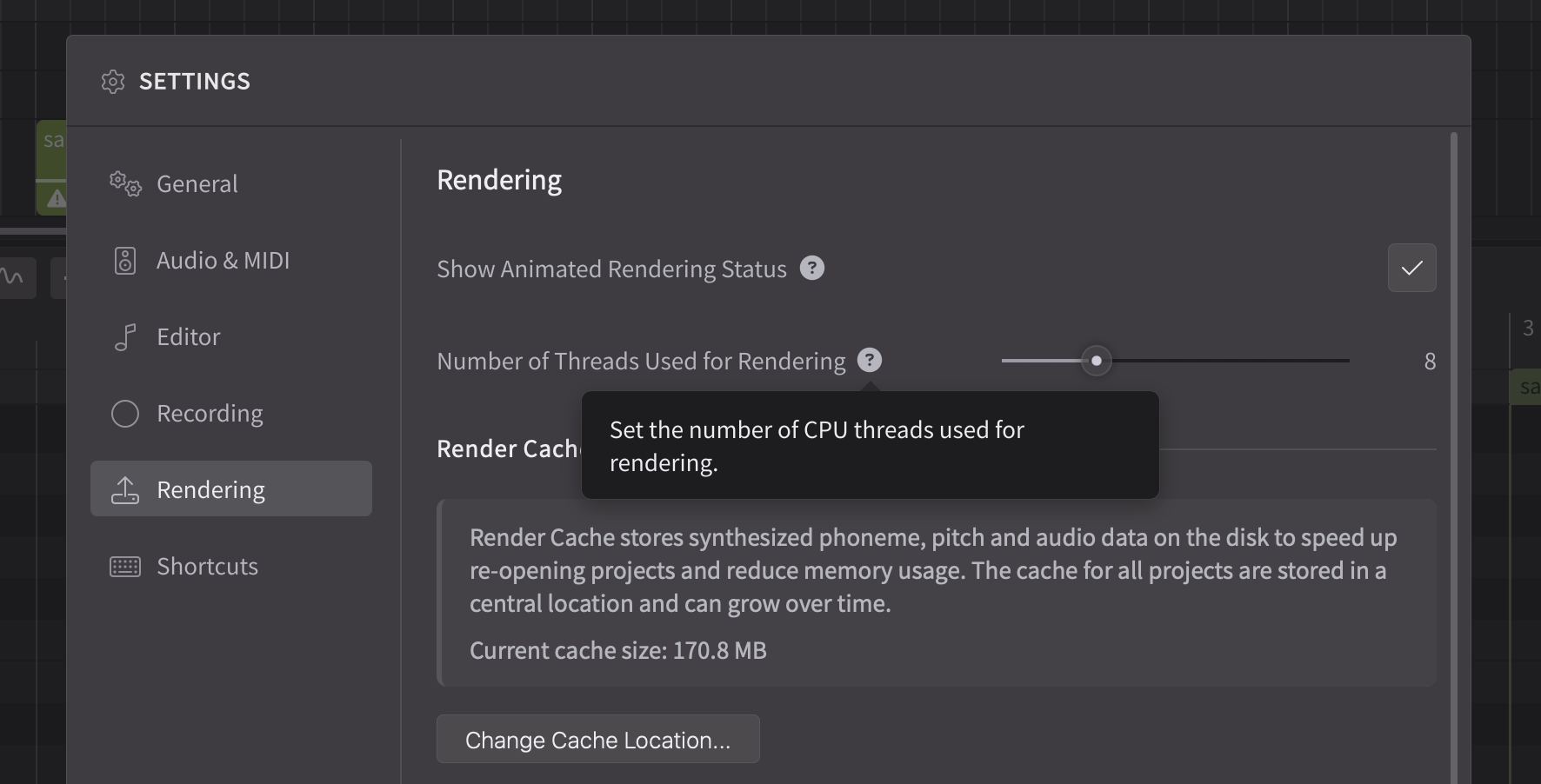
Version 2.2.1b1 introduces a setting to specify the allocation of threads dedicated to rendering. While the default configuration is generally advised, users experiencing significant slow down should consider reducing this value to fewer than 8 threads. Should this adjustment enhance performance, kindly share your hardware specifications and the optimal setting in the comments. This information will assist us in fine-tuning the default parameter for the final release.
Degraded performance may also result from the introduction of the render cache in version 2.2.0, particularly if the default cache location is a network-mapped drive or a lower-speed HDD. We suggest relocating the cache directory to an SSD if available, or disabling the render cache.
While we welcome feedback on the forum, we may not be able to address the replies promptly. It’s also difficult to request necessary details (e.g. project files) for bug reproduction in a public forum. Therefore, we kindly request that you report issues via the support ticket system.
Synthesizer V Studio 2 Pro 2.2.1b1 (Feb 20th, 2026)
New Features
Added a settings option for the number of rendering threads.
Behavior Changes
When merging two note groups, use the voice parameters from the group with more notes.
Make sure phonemes can’t be resized to less than 0.01s in the Phoneme Timing panel.
Bug Fixes
Fixed crashes when switching between groups during MIDI recording while a MIDI note is still sounding.
Fixed crashes when reopening an ARA plugin project created using Studio One 6.5 in a newer version of the DAW.
Fixed crashes when importing an unsupported or corrupted audio file.
Fixed crashes when exporting a MIDI file from a project with a note group that starts before time zero.
Fixed performance degradation on Windows on CPUs with performance/efficiency cores.
Fixed occasional dropping of singers in a unison during playback and bouncing.
Fixed render cache conflicts after duplicating a track containing the instrument plugin causing the linkage of rendered audio across tracks.
Fixed ARA plugin compatibility with Fender Studio Pro.
Fixed MIDI recording while a choir voice is loaded causing the session to log out.
Fixed plugin’s tempo being reset when reopening a saved Pro Tools session.
Fixed failure to recognize time signatures when importing certain MusicXML files.
Fixed failure to select an audio device on macOS if the target device doesn’t support the current sample rate.
Fixed note groups still displayed as selected when deselecting them via Ctrl/Command + Click.
Fixed the lingering visuals after canceling the creation of a tempo or time signature marker.
Spec: i9-13900K 3GHz / 96GB RAM / SSD storage only
I was involved in a Dreamtonics testing call (with Alex), and we had settled on 8 threads. Using the new 2.2.1b version, I’ve been extremely thorough, making sure I’m doing the same process each time with each value. I have found the optimal setting to be 6. It’s definitely faster than 8, and is so fast (like previous versions), I barely notice the render happening. Going lower than 6 may or may not be milliseconds faster - it’s impossible to tell without something running to monitor it.
No noticeable impact upon choirs/multiple singers.
EDIT: The update only solves the problem for the standalone version. When I run the VST under Cakewalk, the issue persists regardless of the number of threads I set. I have tried rebooting each time to be sure. However, setting environment variable DNNI_MAX_THREADS to 6 does solve things. It therefore appears that the thread setting within Synth V does not affect the VST3 plugin.
If you don’t suffer from the issue, you should leave it at auto so that you get best performance (i.e. it should maximise thread usage). For those of us with the issue, there is some kind of problem with the threads clashing with each other, so lowering the number solves the problem.
12th Gen Intel i7-12700 (8 hyper thread 4 efficiency cores), 128 GB of RAM. Downloaded the beta and my Reaper projects are loading faster which is nice, and the offline warning error while recording is gone as is noted in the patch notes, thanks for that. Tried 8, 6, and 4 threads and rendering is still not great with single voices, but especially slow with the choirs. I still need to reload frequently after opening a project because there’s just no audio (the MIDI synth still works fine). Also, if an instance is rendering when I attempt to remove or offload the FX it will crash Reaper entirely.
The slow rendering would be a lot less frustrating if there was an option to just switch off re-renders while recording/editing. Recording MIDI from the DAW constantly splits or drops notes due to rendering hiccups (why even render during recording, it’s all happening behind the playhead anyway ?!?!?!), and as projects get complicated editing becomes basically impossible because it’s so bogged down.
I’m very glad that they fixed the Fender Studio Pro ARA problem prior to the sale on Choir Voices ending.
Is there currently no way to do a vertical zoom of the piano roll?
If you use a mouse with a wheel, the wheel will be your vertical scroll. If you’re on a laptop with a trackpad, you can probably use two fingers to vertical scroll.
Synth V 2.2.1b1
With the advent of the choir mode there is more of desire to use the multi-out capabilities of Synth V2.
I am really struggling with the VST3 instrument interface, track combined mode for separator outputs in Fender Studio Pro.
I can enable the multiple outputs in FSP but see these issues in routing:
There seems to be a strange shifting of the output if you turn one output off and leave others. Turning off output 1 shifts what is going to output 2.
There’s no direct or user controllable correlation between a track in Synth V and its output that can be defined at the Track level. This would be a great improvement area. Let the user define the output of each track on that track.
I’m really struggling to get it to work without a lot of stuttering when both the transport in FSP and SV2 are running. It comes and goes and have no obvious correlation to buffer sizes. Ironically turning off dropout protection tends to make it work better.
Enabling outputs in FSP causes SV2 to go silent taking a restart of playback.
 EDIT: The update only solves the problem for the standalone version. When I run the VST under Cakewalk, the issue persists regardless of the number of threads I set. I have tried rebooting each time to be sure. However, setting environment variable DNNI_MAX_THREADS to 6 does solve things. It therefore appears that the thread setting within Synth V does not affect the VST3 plugin.