Dear Users,
We’re excited to share the first beta (2.1.1b1) for the upcoming 2.1.1 update to Synthesizer V Studio 2 Pro.
Download Links
Windows: https://drive.google.com/file/d/1XGx6ydqUx7GrGZXeJ_ROU6R6QDU6H6vL/view?usp=sharing
macOS: https://drive.google.com/file/d/180ZTqRowKTV02RLmQz6WRE1KyYe_RL-A/view?usp=sharing
About This Beta
This release significantly expands scripting capabilities, bringing them up-to-date with features introduced in version 2. You can now create and share JavaScript and Lua scripts to access and modify retakes, pitch control points/curves, detailed vocal mode parameters, track mixer, and even detailed consonant timing and activity parameters.
We’ve also updated the scripting manual to document these new features:
https://resource.dreamtonics.com/scripting/index.html
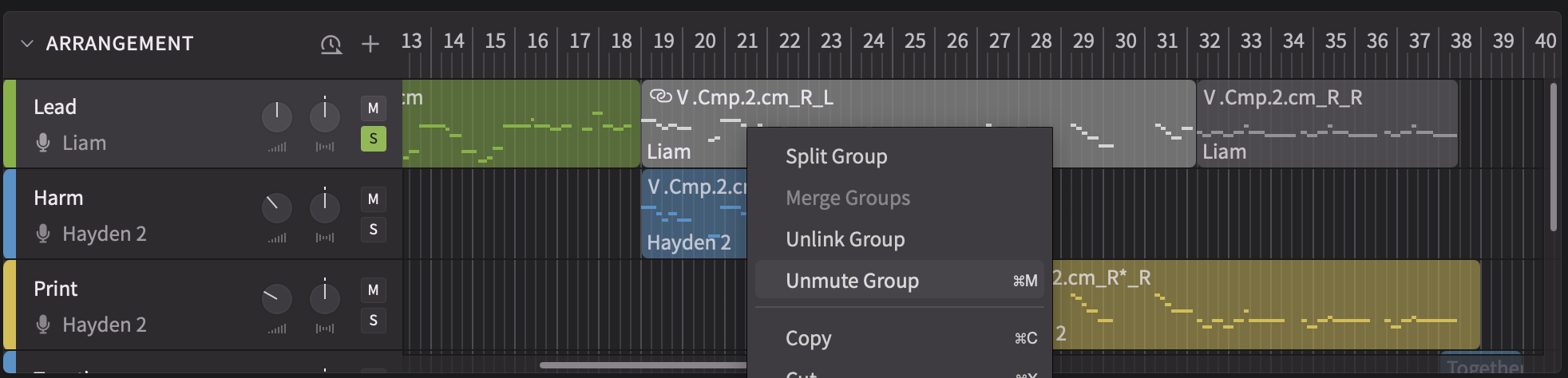
In addition to scripting enhancements, we’ve added the ability to mute and unmute groups:
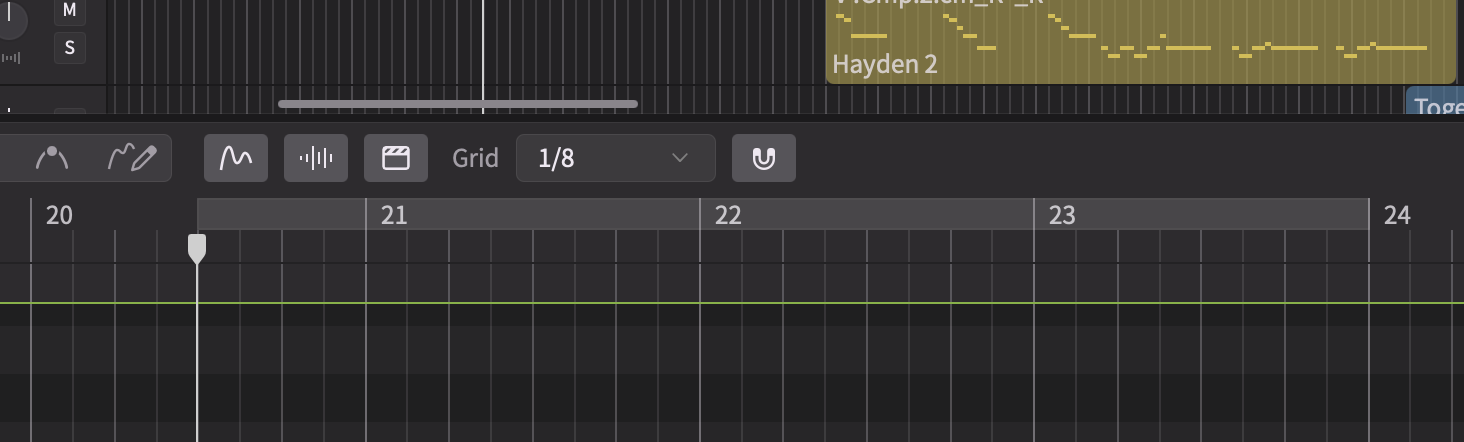
As an experimental change, we have adjusted the visuals for the loop region to align with the refreshed UI in version 2. Please share your thoughts in the comments below!
Reporting Issues
Please submit bug reports through our support form. Please specify version “2.1.1b1” in your ticket:
https://dreamtonics.zendesk.com/hc/en-us/requests/new?ticket_form_id=44558189476505
While we welcome feedback on the forum, we may not be able to address the replies promptly. It’s also difficult to request necessary details (e.g. project files) for bug reproduction in a public forum. Therefore, we kindly request that you report issues via the support ticket system.
Synthesizer V Studio 2 Pro 2.1.1
New Features
- Added a command for muting/unmuting selected groups or notes.
- Expanded scripting support:
- NoteGroupReference.isMuted() and NoteGroupReference.setMuted()
- NoteGroupReference.setTimeRange()
- SV.getComputedAttributesForGroup()
- SV.getComputedPitchForGroup()
- SV.print()
- Added expValueX, expValueY, muted, evenSyllableDuration, languageOverride, phonesetOverride and phoneme attributes to Note.getAttributes() and Note.setAttributes().
- Added RetakeList object and NoteGroup.getRetakes()
- Added TrackMixer object and Track.getMixer().
- Added vocalModeParams to NoteGroupReference.getVoice() and NoteGroupReference.setVoice().
Behavior Changes
- Blocked keyboard shortcuts and menu commands when the License panel or Settings panel is open.
- Reset Pitch now also removes pitch control objects over the selected note.
Feature Enhancements
- Updated the visuals for the loop region.
Bug Fixes
- Fixed crashes when undoing a pitch control modification while some pitch control points are still selected.
- Fixed crashes when moving a group across tracks.
- Fixed data loss in REAPER when a project is saved with the ARA plugin loaded only on empty track(s).
- Fixed stuttering playback when the ARA plugin is followed by an effect plugin with large latency.
- Fixed Alt/Option+Drag being able to duplicate an instrumental on the same track, causing project data corruption.
- Fixed Alt/Option+Drag not working for pitch controls associated with selected notes.
- Fixed voice download progress exceeding 100% on Windows.
- Fixed the rap tone/intonation sliders in the Notes panel not showing the default values predicted by the system.
- Fixed phoneme labels above notes blocking area-selection on the piano roll.
- Fixed Dictionary panel not responding to Cross-Lingual Synthesis and only listing dictionary options for the voice’s original language instead.
- Fixed retake indicators not showing immediately on newly pasted notes.
- Fixed Vibrato Envelope parameter modifications not affecting the pitch after resizing the left boundary of the parent group.
- Fixed Voice-to-MIDI conversion creating lots of redundant notes at 100% sensitivity.
- Prevented loop markers from being dragged to before the start of the timeline.