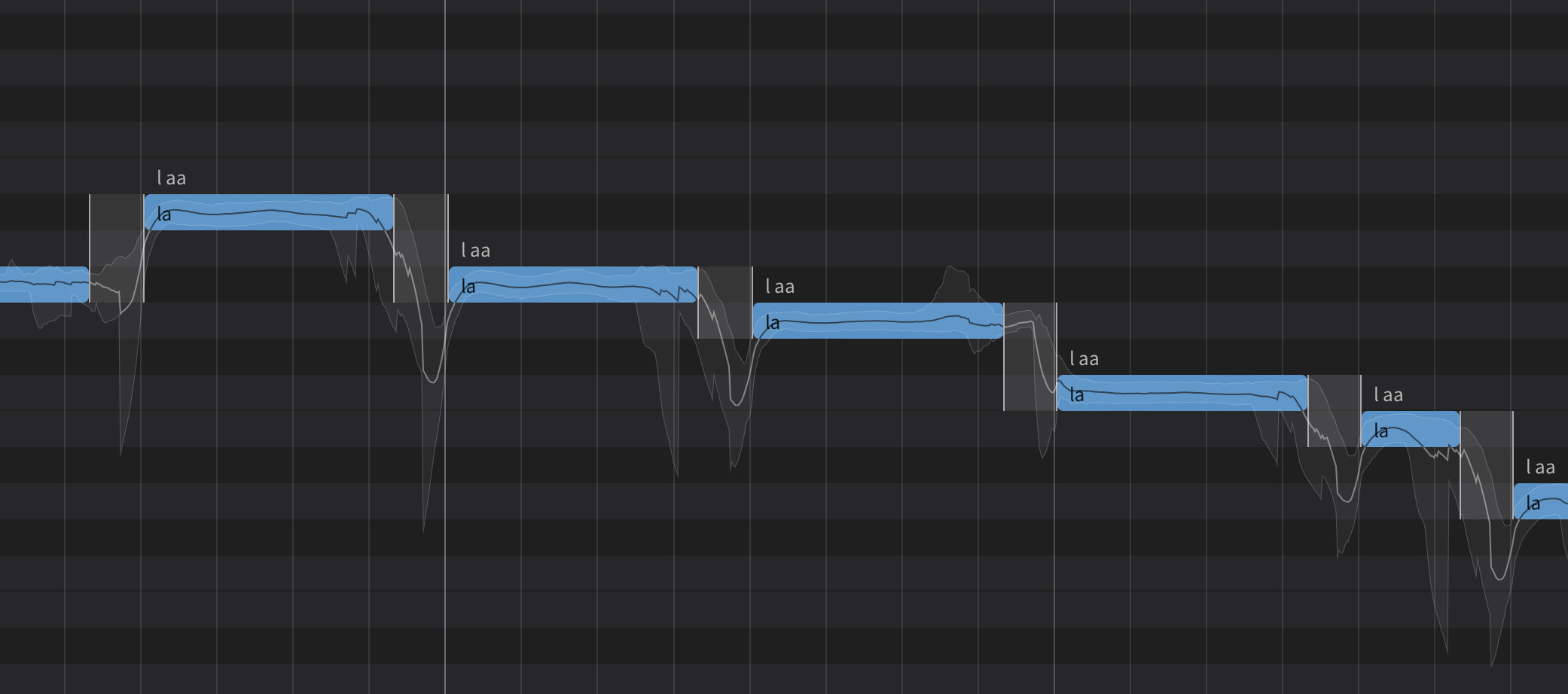
After perusing the manual and searching the forum, I’ve not found applicable solutions to the ‘swooping’ I’m getting between pitches. I really REALLY do not want to have to go through and draw the pitch lines for every single note because that is going to amount to hundreds if not thousands of edits across 4 voices in a 5-minute composition, so I’m reaching out for assistance and solutions.
I’m importing a 4-part midi file (SATB) from a notation program and, regardless of the settings I tinker with on the ‘VOICE’ or ‘NOTES’ panel, synth V2 insists on adding in those swoops that slide between notes like portamento, bypassing the target pitch and doing so annoyingly early to the beat, even up to 1/8 note early. Increasing the number of singers seems to reduce the effect a tad but it’s still there and noticeable on listening.
When I tinker with ‘Choir Spread: Note Start, Phrase End, Pitch’ there is little to no effect on correcting this awful feature, but it does make it worse.
When I tinker with ‘Expression’ it seems splitting the difference between ‘Raw’ and ‘Refined’ maxed-out to the right reduces it slightly.
Anyone with a proper solution to this problem besides uninstalling the app and asking for a refund?
Do you have a screenshot of what exactly you’re having issues with?
That’d make it immediately more clear how to explain and help.
1 Like
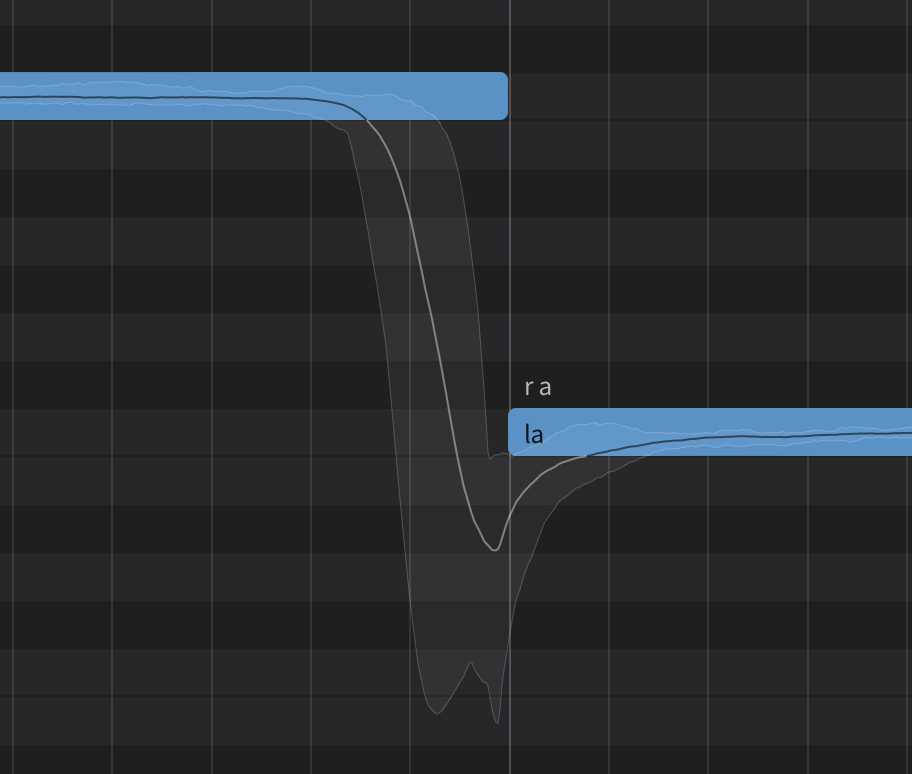
Listening to this playback it sounds like it was recorded on a bumpy dirt road, unacceptable. Granted there is some natural portamento in the best choirs in the world, but not to this extent and not to this depth. It would be nice to find some setting somewhere that eliminates 80-90% of it…
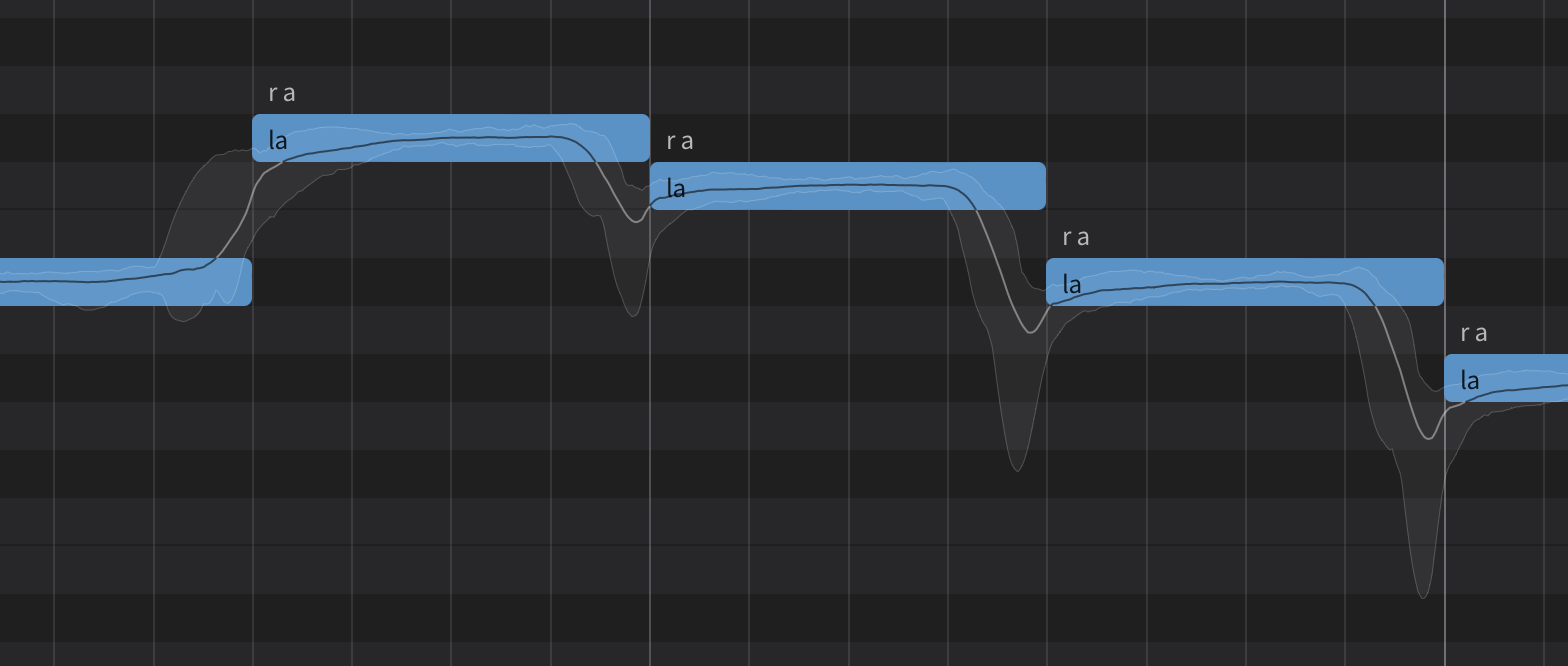
Ok I see what you mean. It looks like the dip mainly comes from the consonant. Consonants don’t typically hold a pitch so they’re often depicted as a dip in the pitch line. The choir/unison function renders each extra voice similarly to another take. So the big pitch differences likely comes from that. You could try different takes, draw the line yourself, or use the “Rigid” mode on your expression panel to flatten the pitch, but you’d have to draww your own pitch lines there too. If you use the Smart Point feature, you could set points for the pitch line to follow and use the AI retakes.
1 Like
I’ve deleted my other more serious attempts, this was a quickie just to get your requested sample screenshots, hence the ‘la la la’ text (and I forgot to select ‘English”); but, that is immaterial to be honest. When I’ve typed in my intended text in earlier attempts I get the same swoops and the initial note is atrocious, it sounds like we’re launching a rocket to get to the pitch-moon. Fiddling with the ‘Consonant Strength’ setting does nothing substantive regarding the swoops.
I wasn’t expecting to create such a headache of having thousands of edits to correct being that the old, simple score writing program I use executes fairly good results with an orchestra sound bank, but then again with the horror stories I hear about Ai across various disciplines, maybe I shouldn’t be surprised that it creates more work than it’s worth. I’ll keep tinkering with it but at this point I’m pretty well convinced it was a waste of money for my composing purposes and will pass on my results to others.
I’m not sure how far you want to go with it, but you could try disconnecting the notes - so have a little gap in between each. You’d want it small so that it retains smoothness. You can apply the gap to all notes by selecting them all, then moving the right side of one note to the left a little. This will move all selected notes the same amount. Keep doing what you’re doing in addition with expression - I would put it right in the bottom left corner to start. You can add some vibrato by increasing the vibrato slider. Then gradually move the expression slider to the right a little until you’re happy that you have a decent compromise between no slides, and a robotic sounding note. You could also try adding a glottal stop to the start of each word (use an apostrophe before each word, no space after it).
If that doesn’t go far enough, you can try moving the first phoneme of affected words so that it lines up with the start of that note. That way it wouldn’t anticipate the beat, and should be a clean transition. You might need a combination of these things to get the result you want. Would likely be as much work as drawing in Smart Pitch Control mode.
If this is too much work, its possible tha SV isn’t for you. I don’t think Dreamtonics has the same kind of background musically as, say the developers of Cantai, and I also suspect, based on their entire voice catalog, that classical is not currently a huge part of their market demographic. I think in terms of versatility, Dreamtonics is hard to beat, but its not for every situation, and maybe something else will work better for you.
1 Like
I think it’s due to the nature of the program. The Consonant Strength will not affect the pitchbends for the consonants, just the Phoneme Panel’s strength.
The Unison feature uses different takes to make each performance not a 1:1 of the main track. So those large dips are consonants, it also shows roughly, how much the difference is in each take (shown as the rough outline of the pitchline). It’s recorded from an actual choir so it’s the AI guessing how the choir would sing it based on it’s data.
You’d just have to work with it if you want to use it. As a hobbyist, I find it a lot of fun to really get into it but I also understand that workflow is not for everyone.
1 Like
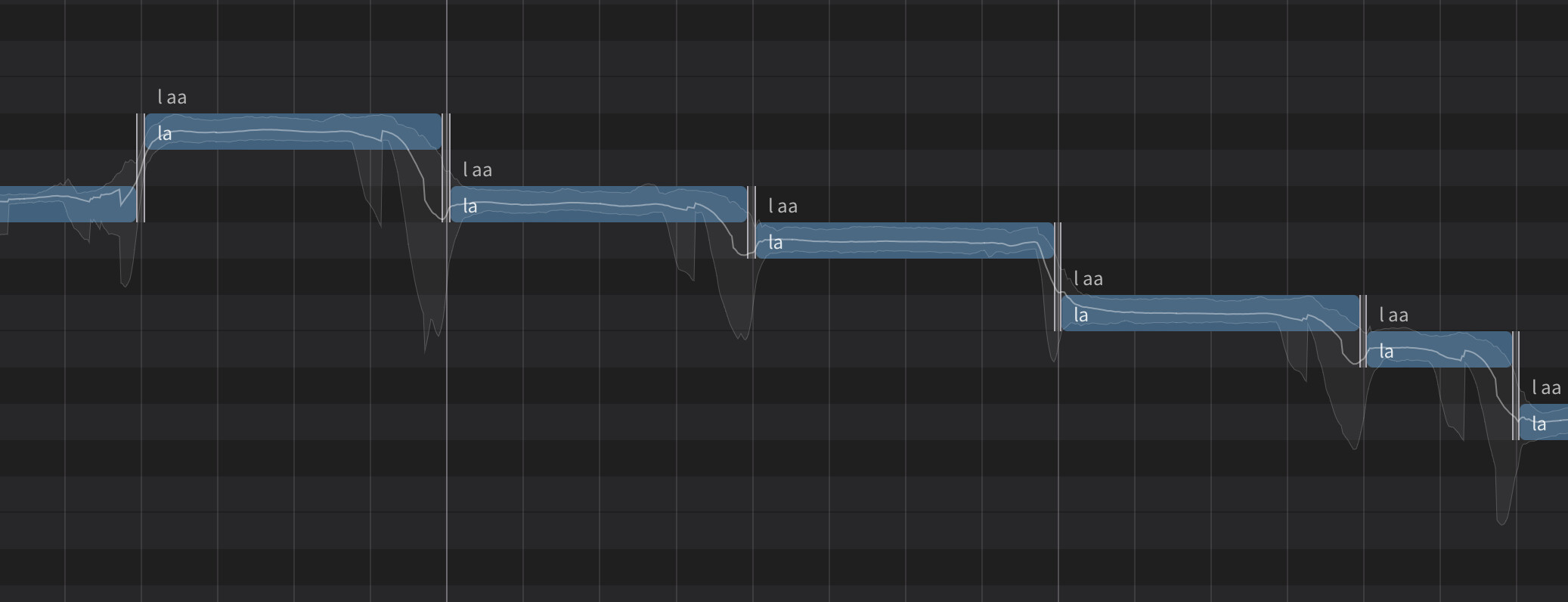
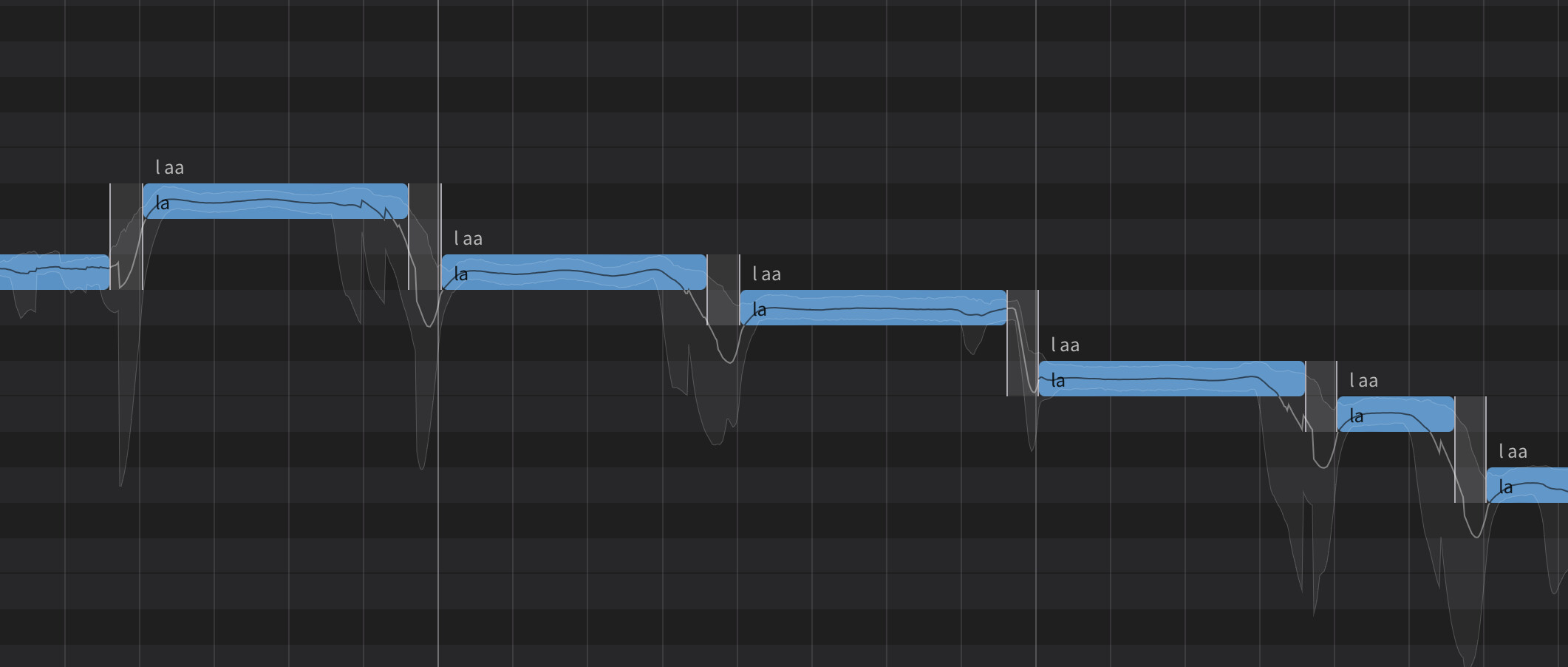
Yup, great mindmachines think alike: I already tried the gap method thinking maybe the app needed ‘space’ to get to the next note, and it would have been a super easy fix because (as you mentioned) I discovered you can gang-edit the note-durations by ‘selecting all’ and using the cursor on the piano roll to nudge either the beginning or end of the notes to create said space. And I was hopeful it was going to work; but, alas, no. Here are some screenies to show exactly what’s happening; the ‘Expression’ bug is almost pegged in the bottom left corner of ‘Rigid’ (‘Vibrato’ at .86 so it isn’t robotic) for these examples of the same handful of notes with different ‘gaps’ between:
Trying out a tiny gap, you can see the sequential swoop happening at the end of each note, slightly bypassing the pitch of the next note, then coming back up. It sounds like ‘cowboys-and-indians’ hand over the mouth whooping… it’s SUPER annoying to hear…
Larger space, more swooping…
Larger space yet again, even more swooping…
I’ve not tried tinkering with text yet as you proposed, but you are probably right, this app is not adequate for composers working in the style I am. I’ll check out the free trial of Cantai and ask for a refund… good luck there LOL!
Hey, thank you for checking in with your suggestions, happy composing 
Thank you for sticking with me this deep in to the topic. I will likely keep tinkering with it and check back to the main forum from time to time to see if this malfunction has a work-around or gets fixed in a new version of the app.
Godspeed in your composing and may the voice of melody be ever by your side!