Can someone direct me to a script that can fix the phonemes in Choral Voices 2 so that they sound more English and less Mandarin? Many thanks.
1 Like
I am bad at scripting but try checking the ea ia ua oh phonemes in English and also { in Portuguese, and see if you can arrive at something that sounds good. If not, I don’t know what to do
I’m trying to get Copilot to write me a script. If it works I’ll post it here.
Does anyone out there fully understand how phonemes work? I’d love a logical explanation…thanks, P
i suggest you ask Microsoft Copilot, i’ve used it to get all kinds of help with Synth V. It can help you set up vocal settings etc to achieve just the kind of sound you want etc. Really good resource.
Pgonemes simply represent how a word sounds. For example if you have the words “cat” and “Kate”, the “c” and “K” make the same sound, so they are represented by the same phoneme. However, the “a” in “cat” and “a” in “Kate” makes a different sound, so they are different phonemes, ae and ey.
1 Like
Thanks on this and what doesn’t make total sense is that the “a” in cat being represented by ae. I would think it’d be ah.
Also, who decided it would be ae?
What would be helpful would be a list of all of the basic phonemes and just like you did, have an example of a word that it’s used in. Does such a list exist?
thanks so much, Peter
ae is the sound in cat. ah is the sound in cut.
That is not the correct SynthV list, this one is correct:
aa vowel
ae vowel
ah vowel
ao vowel
aw diphthong
ax vowel
ay diphthong
b stop
ch affricate
d stop
dx stop
dr affricate
dh fricative
ea diphthong
eh vowel
er vowel
ey diphthong
f fricative
g stop
hh aspirate
ia diphthong
ih vowel
iy vowel
jh affricate
k stop
l liquid
m nasal
n nasal
ng nasal
oh vowel
ow diphthong
oy diphthong
p stop
q stop
r semivowel
s fricative
sh fricative
t stop
tr affricate
th fricative
ua diphthong
uh vowel
uw vowel
v fricative
w semivowel
y semivowel
z fricative
zh fricative
pau silence
sil silence
cl stop
br silence
In IPA, the vowel in “cat” is written /æ/. Probably that’s why.
1 Like
i presumed the user went to the SV help site and has the list of SV phoneme.. the lists i added included the word examples… 
I sure appreciate the help here.
On the above correct SynthV list could you fill out the rest?
aa vowel
ae vowel as in cat
ah vowel as in cut
ao vowel
ey as in Kate
and examples of all of the remaining phonemes…
not the sv help site, the internal files! C:\Program Files\Synthesizer V Studio 2 Pro\clf-data
also your lists have no Arpabet and would be useless for SynthV
aa vowel - father, palm, start, lot
ae vowel - trap, bath
ah vowel - strut
ao vowel - thought, north, force
aw diphthong - mouth, bough
ax vowel - comma, lemon
ay diphthong - price, buy
b stop - bassoon
ch affricate - chopstick
d stop - dot
dx stop - butter, middle - this is the “funny T” sound that Americans use, sounds similar to an “r” or “d” sound
dr affricate - drop
dh fricative - the, this - this is the voiced Th sound, sounds like “Thzzz” like a buzzing bee. do NOT confuse it with the th phoneme
ea diphthong - this phoneme was added in 2.3.0tp1 and did not exist previously. Dreamtonics quietly added four new vowels and did not publicly acknowledge it. It is possible this could be the vowel for square, in British accents.
eh vowel - dress, let
er vowel - nurse, fern, bird, letter
ey diphthong - face
f fricative - fun
g stop - get
hh aspirate - home
ia diphthong - this phoneme was added in 2.3.0tp1 and is part of the quiet addition. It is possible this could be the vowel for near, in British accents.
ih vowel - kit
iy vowel - fleece
jh affricate - gem, jam
k stop - king, cat, queen
l liquid - lick
m nasal - mint
n nasal - nick
ng nasal - king, singer - this phoneme does not include the harsh g sound in it. the word singer without the harsh g sound is s ih ng er. But “finger” has a harsh g sound and thus would have an extra g phoneme after the ng, as in f ih ng g er.
oh vowel - this phoneme was added in 2.3.0tp1 and is part of the quiet addition. It is possible this could be the vowel of lot as distinct from father, in British accents. Alternatively, oh could be the vowel of thought and north, with ao taking the role of lot. The exact way the oh will be implemented is unknown.
ow diphthong - goat
oy diphthong - choice
p stop - putty
q stop - This used to be the sound in uh-oh, but now it’s deprecated, but for unknown reasons, 204b1 can actually say it better than the 201 voices. Try using the phoneme cl instead.
r semivowel - rabbit
s fricative - sick, circle
sh fricative - shop
t stop - tea
tr affricate - treadmill
th fricative - thud, think - this is the voiceless Th sound, sounds like “Thhh” like a flat tire. do NOT confuse it with the dh phoneme
ua diphthong - this phoneme was added in 2.3.0tp1 and is part of the quiet addition. It is possible this could be the vowel for cure, in British accents.
uh vowel - foot
uw vowel - goose
v fricative - violin
w semivowel - wax
y semivowel - yellow
z fricative - zoom
zh fricative - genre
pau silence - this one may not work. use sil instead
sil silence
cl stop - this is the glottal stop. like in the word uh-oh
br silence - this is the sound you make when you inhale in between words
1 Like
Oh heavens Zly! This is exactly what the doctor ordered! Thank you, thank you, thank you!
Hi Zly, you seem super adept with SynthV and also very helpful. Here’s a question I have:
I have a short note that is a melisma (use the minus key) and the note isn’t sounding.
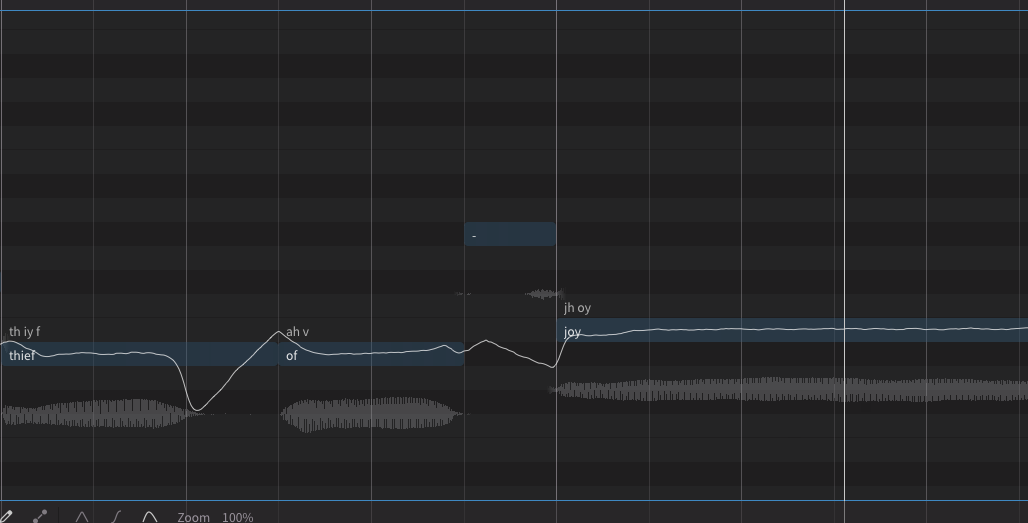
then I type in a lyric in that “melisma” note and it is sounding.
What’s going on? many thanks, Peter
notice the pitch line. It’s flat. try to change the pitch line so it reaches the top. also looking at the waveform, your melisma note is all consonant so it will sound flat. Try changing the phoneme timing so part of the vowel in “of” is at the melisma
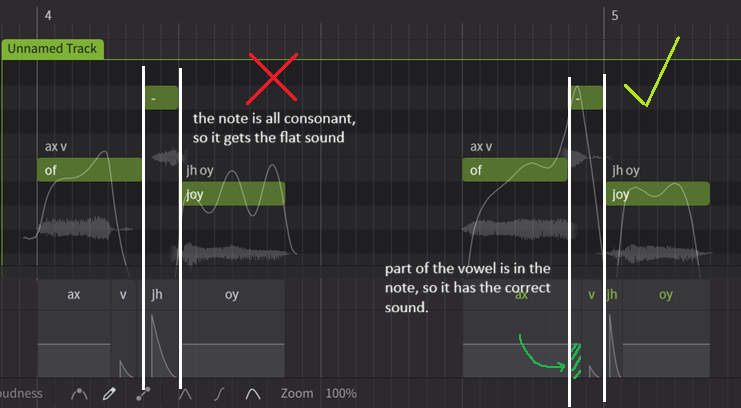
1 Like
Wonderful and this helped. Oh, the little things.
A new question:
I’m trying to get a Pro Tools instrument track with midi notes and with SynthV instantiated on the track to work and it isn’t.
urgggg.
The setup:
PT instrument track with midi notes.
Instantiate SynthV on that track.
SynthV’s built in synth sound is working.
But the midi data doesn’t show up in the SynthV timeline. And no way to import that midi data.
What am I doing wrong?
My work around is to export to a midi file in PT and then import that midi file into SynthV by dropping the midi file into SynthV’s arrangement window.
Kind of clunky work around.
thanks for your help, Peter