I am using Liam to sing one of my songs. It sounds very good except for two notes that are near the end of the song…These are probably the two most important ‘hooks’ of the song. Unfortunately, they sound strident, as if it is a strain on the voice to sing those two notes. Earlier in the song, with the same two notes, but different words, it sounds okay. Also, the notes are in tune, but it doesn’t quite sound right. I have pitched it up and down a bit but it sounds worse. So I am sticking with that pitch; dead centre of the notes.
I will do more experimenting with it tomorrow, but just wondering if anyone else has run into this type of issue?
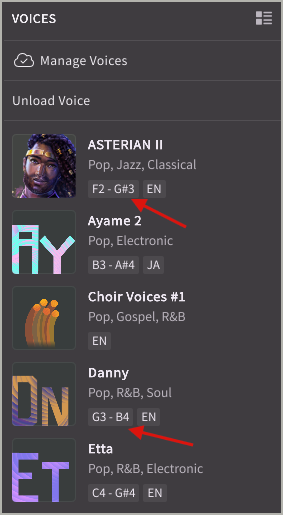
Also, I agree with the suggestions that if the vocal range of a singer was listed it would perhaps make it easier to choose a particular vocalist.
Thank you for your response. This morning I will try this as well. I am working on 5 different options to try to fix that note and the one that follows. If I have any luck, I will post it. I do appreciate your advice!
I had that issue with Kasane Teto, she sounded like straining her voice when singing the vowel “i” in a particular song. I cannot reproduce this issue.
Thank you for your response. I tried adjusting everything I could think of and also did the pitch curve points, etc. with no luck. Today, I ended up using a previous version I had recorded and slipped in my original vocal for those two words. Adjusted EQ and Volume and it is pretty seamless. just couldn’t quite manage to fix the strident combination of those two notes and words.
Being super-critical, there is another Chorus, same spot with two different words, but the same notes that I am finding a bit cringy, so tomorrow I may do the same thing and fly in those two notes and words from my previous vocal….
I’m not complaining about Synth V 2 Pro! It is an amazing piece of software! It just really goes to show the complexities of the human voice and phonetics, muscles in the throat etc. that it takes to actually sing a song!
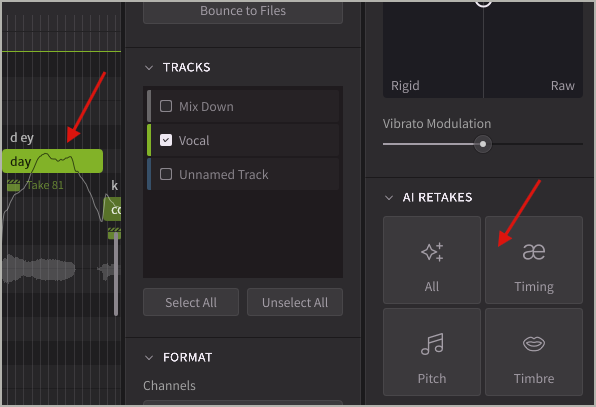
I usually select notes in pairs and regenerate multiple times until I get a sound that works for me. If you’ve already tried doing that, then adjusting the ‘tone’ or ‘tension’ are definitely worth trying.
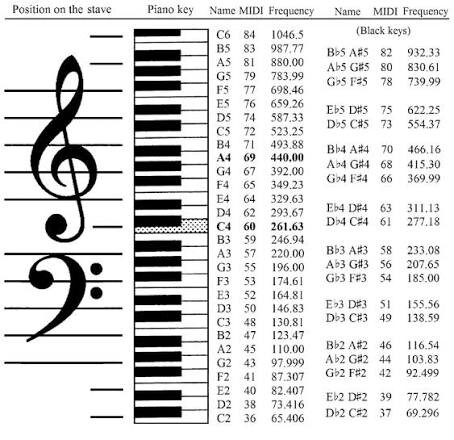
If you have a look at the singer in the Voice panel, the range is givenl. For reference, C4 is middle C, D4 is the note above C4, E4 is the note D4, etc… C5 is an octave above middle C (and so on). For Liam, his ideal range is given as D3–E4 (that is, the first D that is below middle C and the first E that is above middle C). It’s also worth remembering that in music notation, male voices are often written one octave higher than their actual pitch. This is used to keep the notes in the treble clef rather than the bass clef.
Thanks so much for your advice. I didn’t realize that regenerating the two notes would be re-rendered…I will definitely keep this in mind. Also thanks for pointing out the useful ranges in the Voice Panel. I don’t know how I missed that!
Thanks again for all of your helpful info! I had noticed about the MIDI Notes being an octave higher, and it makes perfect sense why; especially for notation.
In relation to regenerating, when a note is selected, the four types of regeneration that the arrow on the right is pointing to become available to use. As mentioned, while I often (re)generate single words/notes, I also often regenerate two or three words/notes. I’ve found that by using this, I often end up with smoother transitions in going from one note to the next. Also, the keyboard shortcut for “All” regenerating a new take is ALT+T
Fantastic information, thank you. There is so much to learn and experiment with in Synth V. Through the knowledge of the other Forum users, there is a lot of experience and advice that comes up. Much appreciated.
Today I regenerated the strident notes on my track and it worked like a charm! I used the AI Retakes on the selected notes and after about the 4th try, I got it to sound exactly as I was hoping to hear it. What a great tool…There is so much to learn and play with, the combinations are endless.