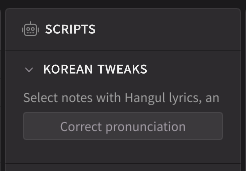
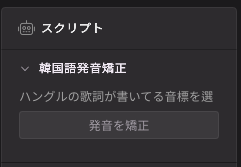
As shown above, the label texts in the new script panel look truncated. The full text is “Select notes with Hangul lyrics, and press the button below.” How can I solve this issue?
The panel width is limited. Therefore, the width of this label object is limited to a single line (< 30 chars, depending on the font). You can add another label object to add a new line.
You can also use a text box with a height of 40.
Note that I’m also making translation of the UI into non-English languages. As for the Japanese example above, there isn’t really a justification for putting the line-break for a fixed position because the clause before the comma is already too long. The full text is “ハングルの歌詞が書いてる音標を選択して、ボタンを押してください。”
Thank you for reaching out to Dreamtonics Support.
Thank you for bringing this issue to our attention. We apologize for the inconvenience you have experienced. We’ve shared the details with our development team.
While a fix may not be available immediately, please be assured that we will make every effort to address the issue in a future update.
Thank you again for your interest in our products.
We hope you have a nice day.