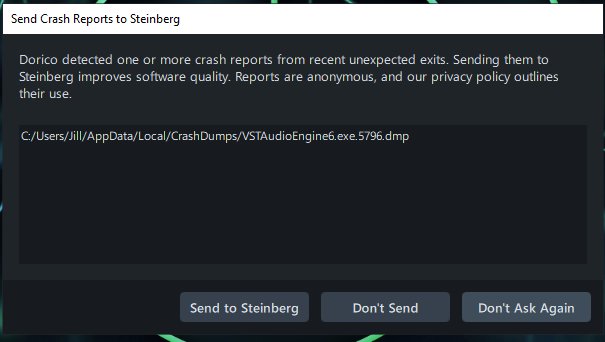
Have sent dump files as Dorico already checked and say its a Synthesizer V issue. It all works fine, then I shut down Dorico. When I go to reopen I get crash report as per below.
Antone else had this or similar?
Have sent dump files as Dorico already checked and say its a Synthesizer V issue. It all works fine, then I shut down Dorico. When I go to reopen I get crash report as per below.
Antone else had this or similar?
Some more infos would be useful, which Synthesizer V version is it?
If it’s the recent v2.2.0 BETA version it might be related to the crashes in Reaper, Studio One and others I reported in the beta thread here → Synthesizer V Studio 2 Pro 2.2.0 Beta - #28 by Layne_Cantrell
Like it might crash Dorico’s “VSTAudioEngine6.exe” on exit, leading to the crash report when you’re opening it again.
I’m not a Steinberg user though, and if you’re not using the beta version I got no clue anyway.
Its the v2.2.0 Beta
Like it might crash Dorico’s “VSTAudioEngine6.exe” on exit, leading to the crash report when you’re opening it again.
Yes, this sounds plausible
Yea sounds it’s more or less the same problem then.
Unfortunately nobody did respond to it over there, so I can’t tell too much about it either. As I mentioned in the thread I’ll wait for beta 3, and if it’s not getting better I’ll open a ticket (would’ve done that already, but I’m awfully busy atm).
And although they aren’t directly answering here I’m fairly sure they recognize it, at least I hope so…
fingers crossed eh.
Don’t know if its damaging anything but hopefully not
Tried it in DAW Cakewalk and no problems. In my case it seems it only happens with Dorico
Thanks for the info.
On my end the exact behavior highly depends on the respective DAW/host, the majority is crashing (on exit), others don’t. It probably matters how the DAW/host is handling plugin-hosting tasks in the background.
What about your standalone version? Mine is crashing all the time on exit (once a Voice was loaded).
Are you on Windows 10, or is it 11? I’m on Win10.
Like you I don’t know if it’s breaking something or so, but at very least it’s surely not intended behavior.
Like you, Windows 10. It shows the crash report when I reopen Dorico
I’m waiting to hear back from dreamtronics and will let you know when/if they do
So heard back and they said to do a total uninstall then reinstall. Did you try this? Don’t want to go through the steps if its been tried and doesn’t work?
Thanks.
I haven’t tried that before and only had time for a quick and dirty uninstall/reinstall a few minutes ago. Meaning just the regular Windows uninstall procedure, usually I’d use RevoUninstaller or so for a clean uninstall.
But I wanted to see if regular uninstall might already work, which it doesn’t. Same crashes in Standalone, Reaper and Cantabile after installing the beta2 here.
It’s not too surprising though, because the Windows uninstall process leaves a lot behind, for example the “C:\Users...\AppData\Roaming\Dreamtonics\Synthesizer V Studio 2” directory remains untouched. Means all the settings, licenses, etc are still preserved, therefore it’s also not really changing much because of it.
Seems if anything it’s required to really clean the old installation up, maybe delete registry entries, rebooting the PC and so on. I won’t have time for that until at least Wednesday, but it’s fairly safe to say regular Windows uninstalling won’t fix anything.
After sleeping one night and thinking about it, I finally submitted a support ticket.
Because I’m not a fan of it at all when their only advise is a “total uninstall then reinstall”. Sounds more like a crowbar desperation move to me.
And there’s a number of uncertainties to it, like what will happen to (DAW) projects with SynV instances where the vocals aren’t bounced out yet? I’m assuming all of that will be lost after a “total uninstall”.
Or what about the recovery files in “C:\Users\User\AppData\Roaming\Dreamtonics\Synthesizer V Studio 2\recovery”? Should they be backed up before uninstalling, could they be brought in again after reinstalling, would they work again?
And what about the cache? Wouldn’t deleting (aka uninstalling) it extinguish past work?
Nope, that’s not sounding convincing to me at all.
While waiting for a response to the ticket I might be testing some things, but only carefully, and without knowing if it makes even sense…
This is the instructions I recieved from dreamtronice..thought like you am loathe to go there just yet!
try uninstalling it completely and reinstalling it while logged in as a user with administrator privileges. To see how to perform a complete uninstallation, including manually deleting related folders, please refer to this page: https://sv2.docs.dreamtonics.com/en/uninstall.