I hope so. The cross language synthesis takes a significant step back in SVS2.
1 Like
I hope you’re right that SV2 will surpass V1 eventually, but that makes me feel worried that in years time, when they finally surpass V1 with V2, they will announce SV3 and take it all from the top again 


 i hope i’m wrong
2 Likes
You might be right. This is how the business works, I am afraid. And perhaps Windows and Apple OS support will be cancelled for the ‘benefit’ of Android. 
I have to say, now with the 2.1.0 Beta things seem to run pretty smooth UI-wise. I am yet to find a way to login in order to register it (which is also required to enable Offline Mode AFAIK), but apart from that, I have high hopes.
With some fiddling it’s working pretty well for me.
The Standalone that is, haven’t tried the DAW plugins.
The login wasn’t really an issue. Installing Voice Databases and using the Settings window was, since they rely on a edge web view.
Which didn’t show anything for me.
Here’s what I did:
Get the MS Edge Webview installer. Latest version worked fine for me.
Direct Link
How I set up the wine prefix:
# Create new wine prefix, or use an existing one.
# Your call, but preinstalled things might cause other issues
WINEPREFIX=~/synth_v wineboot

# dxvk is needed for rendering the main gui as direct2d is not working at all
WINEPREFIX=~/synth_v winetricks dxvk

# the wineprefix should already be on win10, just to be sure since the edge setup fails on older versions
WINEPREFIX=~/synth_v winetricks -q win10

# install the webview
WINEPREFIX=~/synth_v wine MicrosoftEdgeWebview2Setup.exe

# Install synth v
# If you change the path, remember it, we'll need it for the login later.
# No point in running synth V after setup, we need to fix some stuff first.
WINEPREFIX=~/synth_v wine svstudio2-pro-setup-2.1.0b1.exe

# After the setup there's some annoying background processes from the webview installation still running.
# This kills them so winetricks doesn't wait for them to terminate. Which they never will.
WINEPREFIX=~/synth_v wineserver -k

# setting the prefix to win 7 fixed the empty webview in synth v for me, not sure I want to know why.
WINEPREFIX=~/synth_v winetricks -q win7
To patch the login up, create a script named synth_v_login.sh containing this:
#!/bin/bash
WINEPREFIX=~/synth_v wine "C:\Program Files\Synthesizer V Studio 2 Pro\synthv-studio.exe" "$1"
Doesn’t matter where, as long as you remember, and the permissions are correct:
chmod +x synth_v_login.sh
(Also make sure /bin/bash exists)
This simply forwards the uri to synth V with the proper wine prefix.
Finally run synth V
WINEPREFIX=~/synth_v wine "C:\Program Files\Synthesizer V Studio 2 Pro\synthv-studio.exe"
When clicking login in synth v, the system default browser should open.
Firefox in my case. After clicking login in Firefox, it’ll ask how to handle the URL and prompts for an appliaction.
Simply point that to the script and the login should work.
If there’s no prompt, you’ll have to dig through the browser settings.
Webview might not render sometimes, resizing the window or clicking/scrolling around usually solved that.
Win 7 won’t do the trick?
If setting the wine prefix to windows 7 shows an empty webview, it might be worth trying to downgrade the webview.
Wasn’t necessary on arch.
Webview still empty?
Try right clicking in the empty window. If a win 2000 style context menu appears, it’s not the Edge Webview you’re seing.
It’s the wine-gecko replacement.
You can uninstall it with the control panel:
WINEPREFIX=~/synth_v wine control
Also make sure direct 2d isn’t used
~/synth_v/drive_c/users/USER NAME HERE/AppData/Roaming/Dreamtonics/Synthesizer V Studio 2/settings/settings.xml
<ApplicationSettings [...] >
  <General useDirect2D="0" [...] />
9 Likes
thank you for your tutorial! unfortunately for me on fedora 42 it hasn’t helped. it just crashes with a weird error:
err:seh:NtRaiseException Unhandled exception code c0000409 flags 1 addr 0x14059ef8d
I wouldn’t know how to fix it, but for now I’m just thinking about how I’m going to VM this whole thing…
I’m just putting this out here in case somebody runs into something similar.
Yes, I’ve changed the settings to use opengl and not use direct2d.
I got the same error and in the trace I saw a message about missing ntlm auth, so I installed with ‘sudo apt install winbind’ but it still doesn’t work. I will post my version and settings later. I am on the latest Ubuntu Studio and I am using Bottles with a WIN 7 instance.
Hmm, apparently this error code indicates a heap corruption and I’ve found some reports in relation to dxvk.
What’s the output of wine --version ?
I’m on Arch wine-10.8 (Staging)
I’d be interested in seeing what happens when you set the prefix back to win10 or what happens if you install a new prefix without dxvk
Thanks for your reply. I will try later this week when I have more time to look into this.
Today I got SWAM Audio Modeling installed using older JUCE 7 installers and now at least these very expensive plugins are working with everything else.
I am on Ununtu Studio 24.04
WINE 9.21 (due to issues with Yabridge and some VST)
Yabridge 5.1.1
Kernel 6.11.0-1014-lowlatency (64-bit)
I’m on
$ wine --version
wine-10.4 (Staging)
on Fedora 42. I’ll try your suggestion and report a bit later, but thank you for some information, maybe I can make some progress!
UPD: I’ve grabbed bottles and dropped it in there. after disabling DXVK in the settings, it still crashes. I wonder if I need to install any dependiencies, besides mono, that is.
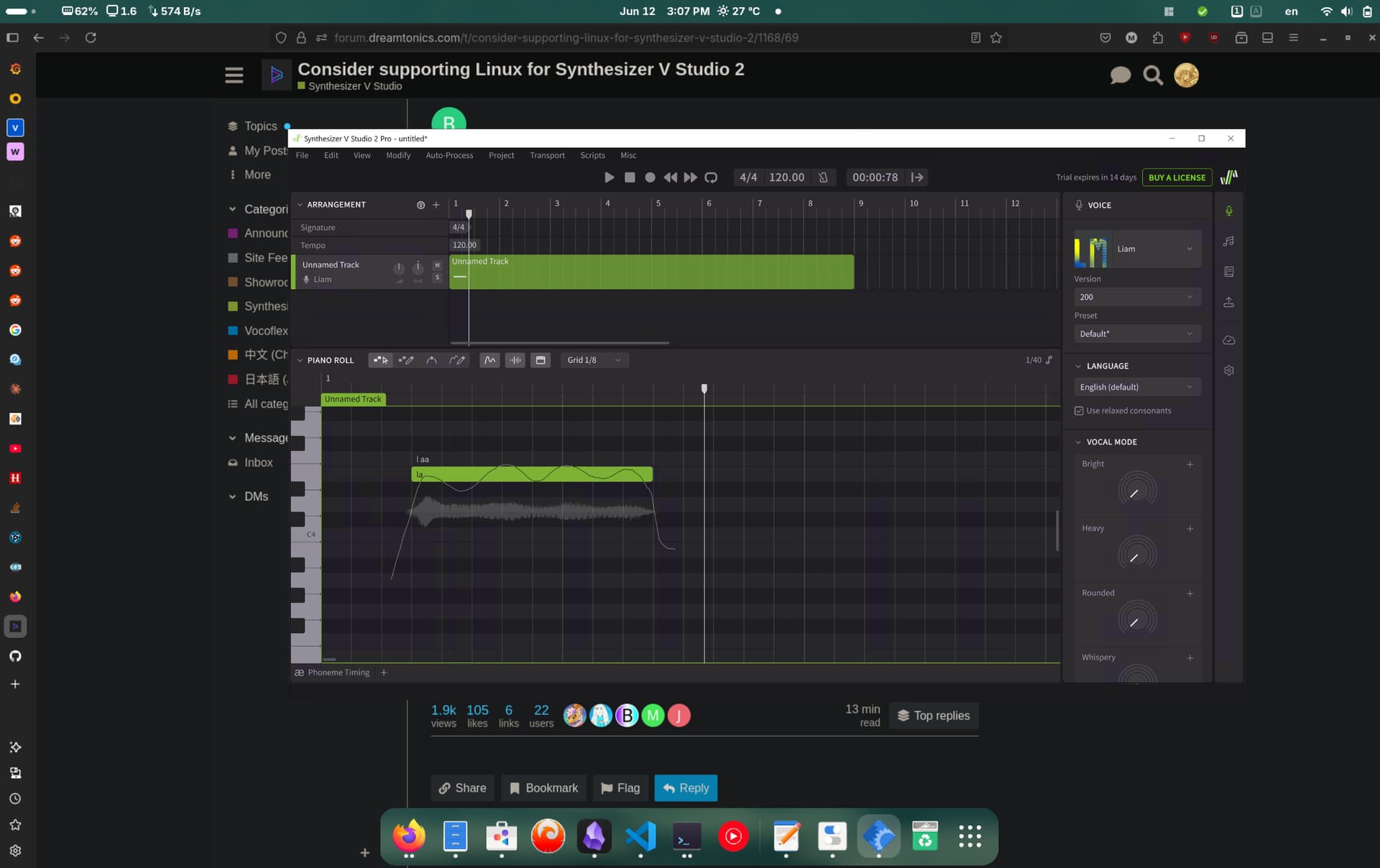
so here I have it, a trial version of Synth V 2 running on linux… kind of. through winapps. not a perfect solution but ideally it would be enough to get me through to the linux transition proper ^^
then, if it works, I can consider an actual license - what’s the point of buying a software if it’s not going to work for me, after all?
2 Likes
True. I would like to add: What’s the point of buying a software for which I have to spent a considerable amount of time to make it work instead of spending that time on music? I prefer to be a songwriter instead of a software engineer.
1 Like
How good to hear that you got it working. I also tried Bottles with different combinations. Could you share what you did?
… then you shouldn’t use Linux
jokes aside I’m fully with you, and it sucks that dreamtonics has, in effect, removed a previously available feature when linux is having such a surge due to win11 being win11 and due to steam deck etc.
I’m really hopeful about the linux future because of EU tech sovereignity efforts, handheld gaming devices running steamos, overall desktop experience being actually good now, and win11 being a steaming pile of spyware garbage, but it still requires some technical knowledge to maintain and troubleshoot, although arguably windows does too - people just notice it less since they’re so used to windows quirks anyway
btw out of curiousity - which distro are you on?
2 Likes
I used winapps:
so it’s not even running on linux through a compatibility layer. good luck setting it up if you decide to try it out!
1 Like
I have been using Ubuntu Studio for a few weeks. I have looked at some lists and Ubuntu always came back as a good Distro to start with. The reason I wanted to switch from Windows is the fact that MS has been working for years to put more and more functions away and the many restarts and things like telemetry are disturbed me.
But I have no hatred or something towards MS. I work with MS products and I am a lot in Powershell and the like.
The advantage of Linux for me is Native Bitwig Support. The DAW that I have been using since V1 (I still have the Cdrom :)) and my Dexibell Vivo S1 is supported as an audio interface. Unfortunately I still had some crashes. So it is not completely stable either.
But all my plugins bought through Wine happily work. The most important was SWAM Audio Modeling. I received the old installers from the manufacturer and even the virtual rooms are working. I am very happy with that.
For synth V I have installed the Linux version, but I don’t see the DAW plugin. If I get it working then I am also satisfied. I liked V1 better to work with despite the bugs.
Thanks! This worked for me. In my case, I had to override the default wine-protocol-dreamtonics-svstudio2.desktop that wine uses to handle the login, I replaced it with this snippet:
[Desktop Entry]
Type=Application
Name=Synthesizer V Studio 2 Pro
MimeType=x-scheme-handler/dreamtonics-svstudio2;
Exec=env WINEPREFIX="<your prefix>" wine C:\\\\ProgramData\\\\Microsoft\\\\Windows\\\\Start\\ Menu\\\\Programs\\\\Synthesizer\\ V\\ Studio\\ 2\\ Pro\\\\Synthesizer\\ V\\ Studio\\ 2\\ Pro.lnk %u
NoDisplay=true
StartupNotify=true
Icon=9D36_synthv-studio.0
Then make sure to update desktop database: (this command should work) update-desktop-database ~/.local/share/applications. You should be able to login now.
Installing edge webview and setting the os version to win7 at the end finally removed those white screens and let me download the vocals.
1 Like
Thank you for sharing your findings. Logging in was successful.
Only now I also run into the white webview boxes. I also tried the stand-alone version of Webview and under Wine different OS versions. What combination should I have and have you still adapted environmental var for WebView?
Fantastic work. Got this working on WINE v9 on SuSE Tumbleweed.
There’s some wonkiness with the webview. I downloaded this one specifically, because it was linked in Bottles. I am not using Bottles however, but the system WINE implementation, which I’ve fixed at 9 for VST compatibility reasons. The linked webview installer is the full binary and doesn’t download additional data. The installer that downloads additional data for some reason keeps crashing out for me, while this one doesn’t.
The webview is sometimes just rendering white, but when moving the window around it sometimes renders properly. Textboxes within the webview seem to not always work. Enabling OpenGL rendering seems to make the webview stop working altogether sadly.
Overall, it works. Sort of. It is more than serviceable, but full, reliable functionality would be nice.
Currently on Debian Bullseye, but very disappointed, as ALSA is not properly started on bootup 1 out of 3 times… Package updates are buggy, too. Will certainly switch to some buntu flavour soon enough, most likely Xubuntu.