Can we please be given a link to the previous 2.2.1 version, so we can continue using out projects that we are working on, without having to go through and do lots of listening and re-editing? Then later when we have finished, we can then re-do the latest download and start new projects fresh in the new system. I think this will work really well if we could please do this and make the previous download available. The 2.2.0 version is there, but not the 2.2.1 version {I believe it is the 2.2.1 March 2 update 2026 version}. This would really make things so much easier and less stressful for me, being in the middle of a large project that uses demos to sell music I’m ready to publish. Thanks so much if this is possible. Update. Just found I still have the download for the 2.2.1 version, but I don’t have the March 2 update, so I’ll just try it and see how it goes.
ok, all is not well. I re-installed the 2.2.1 version, and now the choirs won’t work at all. I downloaded and update to the choirs that was now seen in my main synth 2 operating build, and now, maybe because I went back to a previous version, and instead of a voice update, it gave me the download for the 2.3.0 version instead.
Ok, when I went and opened a previous file…. the choirs would not work. The message I got was telling me I had to install the latest version of Synth 2 to work. However, the previous version worked with the same choir library, so I’m not sure what is going on here at all. Maybe it’s because I cannot find the March 2026 update anywhere. Does anyone know where to find the update part of the Synth 2 playback engine? Thanks for any help with this. I think this would solve the problem I have that the choirs won’t play back now.
In regards to getting things working in 2.2.1 again, can we please have an update file that was used for the March Synth 2 update, so that our choirs can still work in 2.2.1 please? I think that would solve my problem that I’m having. Thanks so much if this can be done.
I tried a system restore, and this took me back to my original synth 2 version, however, the choirs wouldn’t play as I got a message that I would need to update to the latest version. Is it possible to give us a link to the previous choir versions also so? Thanks so much if this is possible.
Not sure what the issue is but did you try using a previous version of the choir in the older version of Synth-V? That would seem to me to be the key. It should still be on your system if it used to be. I think version 202 of the choir voice would be the right one.
hi there, I’m not sure how to use a previous version. The version I was using was working perfectly well on the 3rd of November in the 2.2.1 version, so when I went back, it somehow must have updated itself. I did not download an update from what I remember. Is there a place where we can download a previous choir version at all? Thanks if you know.
oh well, I’m not going to worry anymore. Deciding to stick with the new version. Just have to find where there is anything is I have to correct. Just doing it with a score now. It may be a bit difficult to go back to the previous build. Thanks for your help though, I did appreciate your reply and willingness to help me out. Very kind of you.
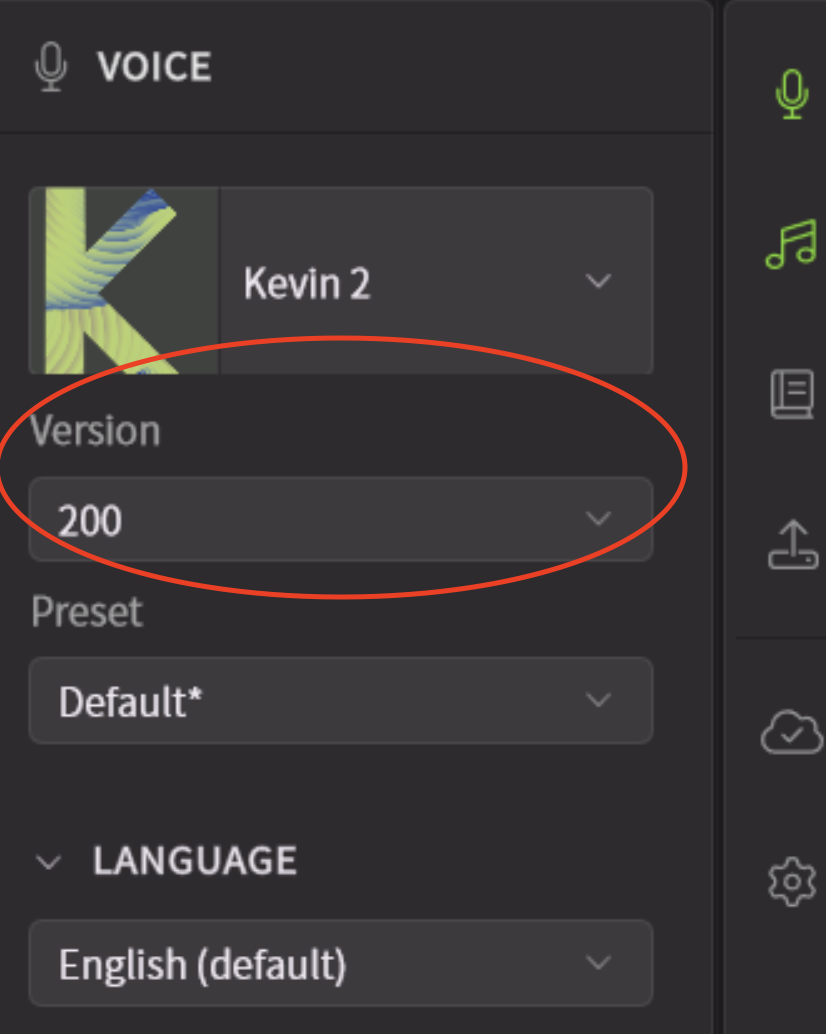
You just select the version in the voice panel. Any version that you have previously installed, should be available in the dropdown. You can download other versions available too, but you shouldn’t need to for one you’ve already used.
After reading all the user comments above, I’m a little bit confused now. Maybe someone from the community can answer the following questions before I actually dare to update my currently installed SV2 2.2.1 application to the latest 2.3.0 version.
I noticed, that an “update” sign has been added in the app’s menu, applicable to many of my owned soundbanks. Currently most of these soundbanks are already on version V202, but I also have all previously available versions installed for each individual soundbank I own (for backwards compatibility reasons). However, instead of offering me the next possible version for each individual soundbank (e.g. V203), it’s offering me the latest V205 option only. Is this normal?
When clicking on such an “update” icon for any available soundbank update, only the SV2.3.0 app is downloaded, nothing else. I guess the app update is necessary first in order to run these new V205 soundbank versions properly, correct?
If so, and I’m really going to install the latest SV2 version 2.3.0 first, will I still be able to select and to use any older soundbank versions as this was possible before (and to download all these via the “manage versions” option as well)? Or will I have to stick to the latest and greates V205 versions only?
To be honest, I don’t want to destroy my existing DAW projects in case the new version insists on the latest soundbank version 205 exclusively. As I have noticed that some users already complained about the fact that these new soundbanks behave and sound differently than before, I just wanted to make sure that this is a safe app update and that I can revert anytime back to my older soundbanks (and SV2 apps) if needed.
Can anybody please comment and/or confirm? Thanks!
Yes @B.Minor there is no V203 or V204 for many voicebanks. So V200, V201 goes directly to V205 if there is no version on them.
If an existing version is available, a new button allows you to download it specifically (accessible by the cloud menu). You can thus retrieve all available versions and select them via the drop-down list within your project without any lost. But the behavior of the SynthV2 2.3.0 could be different.